3. Give AI an Engineering Brief
By the end of this chapter you will have a reusable task-brief template and a completed brief with a result you can evaluate. Start with Chapter 2, checkpoint CP00, your evidence annotation, and this chapter's original reporting fixture. You will ask for a small reporting change, assess the proposed response, and recover from a request that expands beyond its purpose. No hardware or repository history is required yet.
“Fix my sensor” feels specific when you are staring at the troublesome device. To an assistant it omits nearly everything needed to choose a useful action. Which sensor and board? What does the program currently do? What should it do? Does the failure occur during compilation, parsing a fixture, or physical operation? A brief makes the missing context visible and defines when the task is finished.
Writing the brief is engineering work in its own right. If you cannot describe the expected result, an assistant cannot reliably decide whether a change improves it. The purpose is not to discover a universally powerful prompt. It is to turn an intention into an observable, limited task that a person or tool can execute and review.
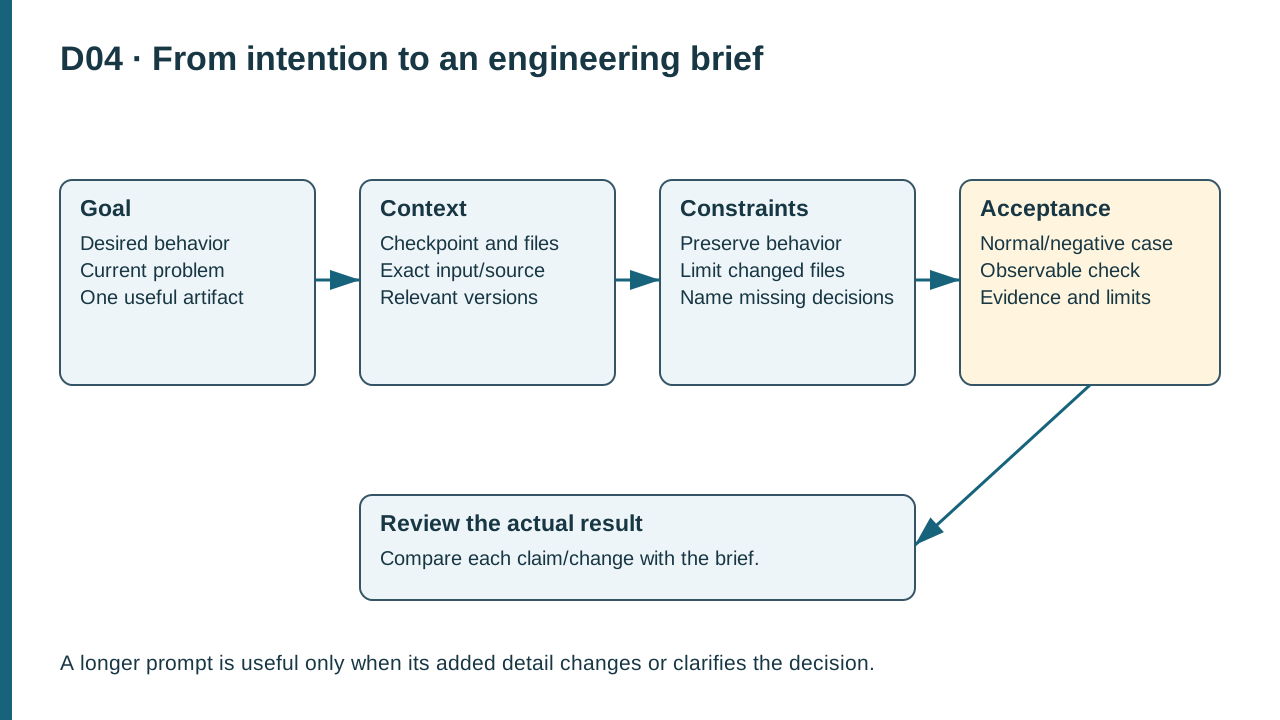
D04. A goal, relevant context, constraints, and observable acceptance produce a reviewable task. The actual result is compared with acceptance.
1. Begin with the goal and current state
Write the desired behavior in one sentence. Then describe the current behavior separately. For the running project, a suitable goal is: “Make the text report identify its input as synthetic so readers cannot mistake a software replay for a physical measurement.” The current state might be: “The sample report contains a temperature and state but no input-origin label.” This distinction prevents the assistant from treating the existing behavior as the requirement.
Include the current project checkpoint or file version. A filename alone does not identify its contents after several rounds of editing. Later we will use a Git commit identifier; now write the checkpoint name and retain an unchanged starter copy. If you have already modified the file, say so and provide the relevant current text. A patch aimed at yesterday's source may be logically sensible and still fail to apply correctly today.
State what has actually been checked. “The supplied sample log contains two records” is inspectable. “The sensor is broken” is a diagnosis that may not have been established. Prefer “The replay reports FAULT on the second record; this is synthetic input; no board is connected.” That description lets the assistant reason about the right system boundary.
Do not omit a failed attempt when it changes the current state. “I tried a new label but did not save the file” differs from “The label edit is saved and the parser now rejects the line.” Preserve the relevant error text and identify which command produced it. A brief is most useful when another person could start from it without reconstructing a long conversation.
2. Supply exact hardware and software context
Context should answer questions that could change the solution. The operating system and shell affect command syntax. The compiler and language mode affect supported constructs. The target and board options affect cross-compilation. The input format affects parsing. A physical sensor's family name is insufficient for board pin decisions; the exact variant and source revision matter.
For an early text exercise, avoid collecting irrelevant details merely because a template has room. If the task is to annotate a supplied response, the serial port is irrelevant. If the task is to build firmware, the board configuration is essential. Scope the context to the decision and link to longer records when needed. Later chapters will make those records durable project files.
The course distinguishes three execution environments. The authoring environment produces this material. The learner workbench runs the editor and host checks. The target is the documented embedded board for cross-compilation and optional physical deployment. A host replay result comes from the learner workbench; it is not a result from the target merely because it exercises shared source.
Write paths in relation to a named root. For example: “From the extracted sensor-monitor folder, inspect fixtures/sample-log.jsonl.” CP00 is an inspection packet: its log uses NORMAL/ALERT and does not supply a validity flag. The separate original reporting fixture in this chapter adds explicit validity for the following exercise; do not infer that field from CP00. Avoid “open the log” when several logs exist. In PowerShell, the current location determines what a relative path identifies. Chapter 4 teaches the commands that confirm that location before executing a build.
3. Set constraints and excluded changes
A constraint tells the assistant what a valid solution must preserve. For the reporting exercise, preserve numeric values, state names, timestamps, record order, and all policy behavior. Permit only an explicit origin label in the explanatory report. Exclude sensor acquisition, dependency updates, timing changes, and unrelated formatting. These limits make review practical.
Good boundaries are grounded in the task. A change to a text label should not replace a sensor library because the replacement creates installation and behavior questions unrelated to the goal. If the assistant believes a forbidden change is necessary, ask it to explain the dependency before editing. That gives you a decision to make rather than a surprise to discover in a large diff.
Separate workflow preferences from enforced permissions. “Inspect only; do not edit files” is an instruction. A runtime restriction that prevents writes is an access control. Use both appropriately, but do not assume the wording of a prompt creates a technical barrier. In the editor lesson you will inspect the actual available actions and compare the final file state with the baseline.
Also constrain the kind of claims a response may make. “Report commands actually run separately from proposed commands” is useful. “Do not claim a physical measurement from this fixture” protects the meaning of the result. “List unresolved assumptions” keeps the answer reviewable when information is missing. These are evidence requirements, not requests for theatrical caution.
4. Provide sources and a useful reproducer
A reproducer is a small set of inputs and steps that produces the behavior under discussion. For a formatting change, two sample records and a desired report can be enough. For a boundary defect, use inputs immediately below, at, and above the threshold. Choose examples that distinguish a correct implementation from a plausible wrong one.
Here is an original illustrative input for this chapter, expressed as a table to avoid implying an executable log format:
| Sample | Origin | Valid | Temperature | Existing report |
|---|---|---|---|---|
| A | synthetic fixture | yes | 27.9 °C | 27.9 C OK |
| B | synthetic fixture | yes | 28.0 °C | 28.0 C WARN |
The desired report adds source=synthetic to both lines while preserving the other values. The table is a teaching example, not recorded program output. When you use the actual original reporting fixture, copy its real field names and retain the filename. Do not edit a captured result to fit this simplified illustration.
Supply an original requirement excerpt that explains the label. A good excerpt says why the distinction matters: “Every replay demonstration must identify its readings as synthetic. A replay report must not claim that a physical board was measured.” This does not require reproducing a full manual. For external facts, give the document title, exact section or page, revision, and link. A source URL without the relevant proposition still leaves review work unfinished.
If you shorten a log, state the selection. “Records 1 and 2 from the supplied fixture; no values changed” is better than a mysterious fragment. If you construct sample input, label it synthetic. The same discipline that makes a research claim traceable also makes a debugging request easier to answer.
5. Define the output and acceptance criteria
The output artifact is what you want returned: a short explanation, a proposed plan, a patch, a test table, or a revised document. Choose it explicitly. “Explain before editing” and “implement the change” are different requests. For a beginner's first brief, ask for a plan and an example result before granting an agent file-edit work.
Acceptance criteria say how you will judge the artifact. They should be observable and proportionate to the change. For this example: both lines contain the origin label; temperatures and state labels are preserved; invalid samples remain invalid; no physical result is asserted; and no unrelated file is changed. A sentence such as “make it robust” supplies none of those checks.
Include at least one negative case. If a record is invalid, the report should not turn its numeric field into an asserted room temperature. If the input origin is unknown, the response should not invent a known source. Those cases reveal whether the proposed improvement preserves the evidence distinction under less convenient input.
Do not use the assistant's own paraphrase as the only test of acceptance. Compare the returned artifact with the brief yourself. Later, run deterministic checks where appropriate. For a short writing change, an exact inspection may be sufficient; for a policy change, executable tests provide stronger behavioral evidence. Choose the check that matches the risk and claim.
6. Worked example: rescue “fix my sensor”
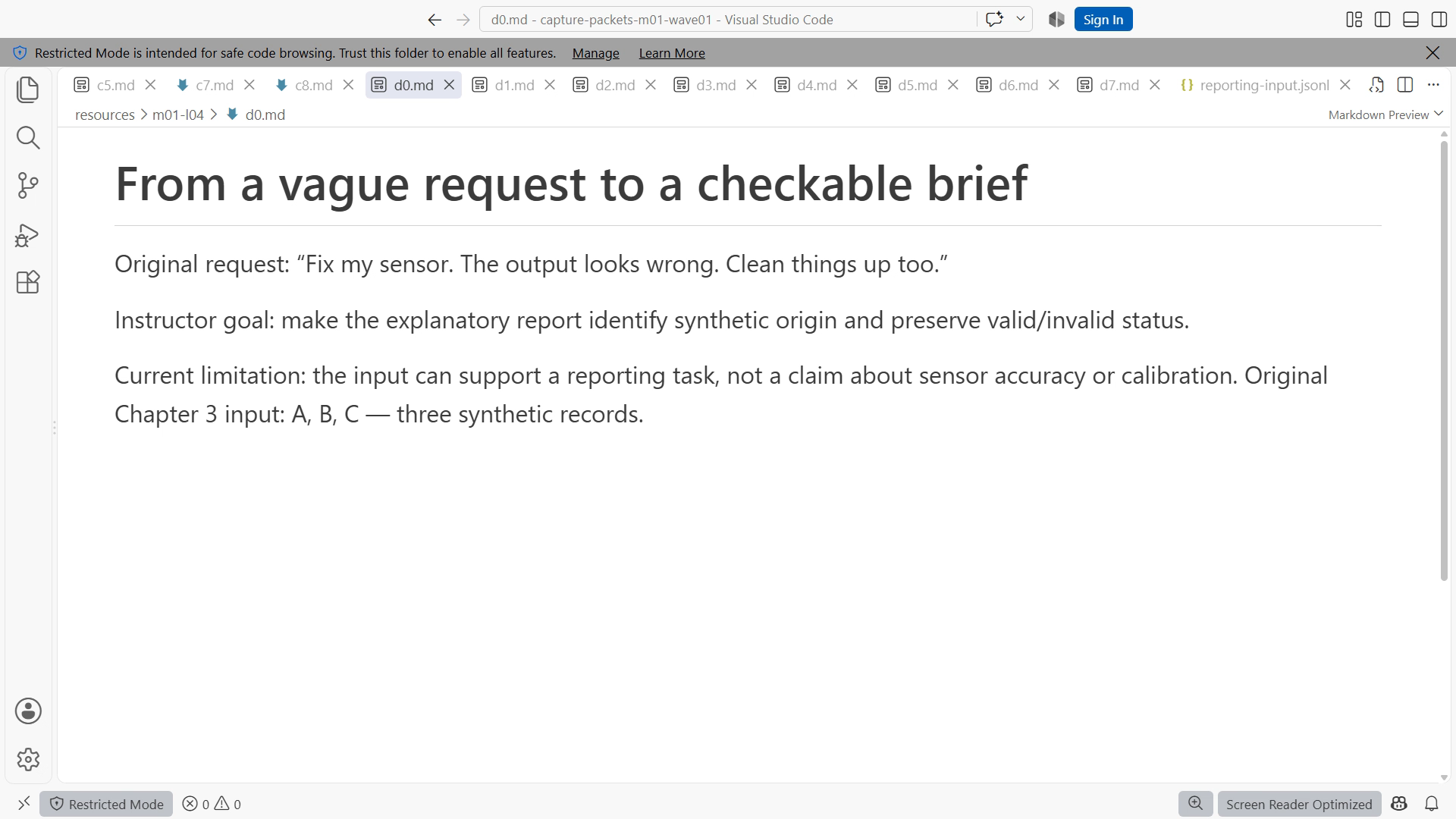
The initial request is: “Fix my sensor. The output looks wrong. Clean things up too.” Missing information includes the system boundary, observed symptom, expected result, affected files, and meaning of “clean.” An assistant may respond with a list of guesses or propose a broad rewrite. Neither can establish which change is warranted.
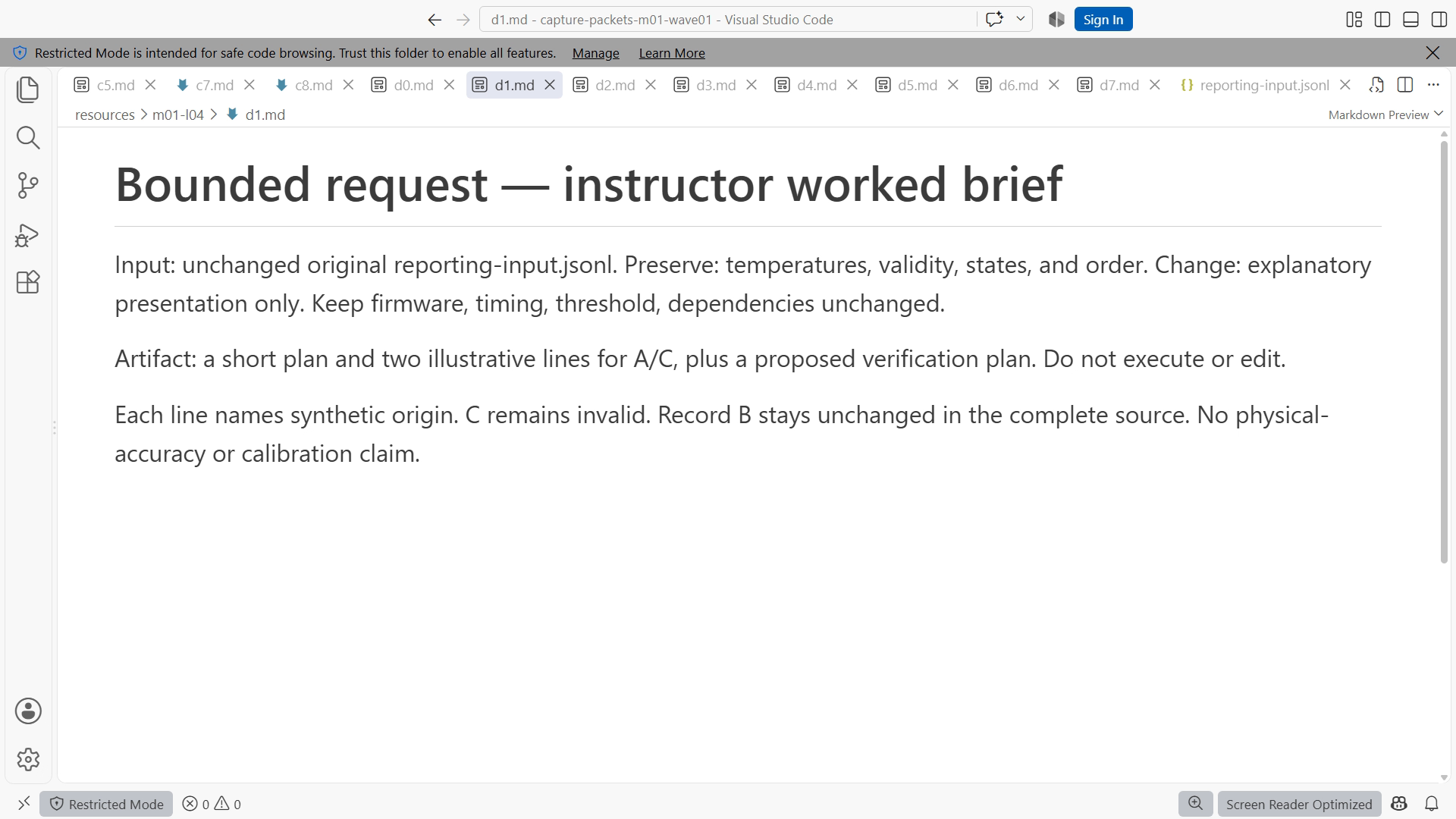
Replace it with the following completed brief. This is an original instructional brief, ready to adapt to your actual checkpoint:
Goal: Make the explanatory replay report visibly identify synthetic input.
Start: Chapter 3 original resources, unchanged copy; no physical board connected.
Input: resources/reporting-input.jsonl and Chapter 2 BenchNote note.
Current behavior: the sample report can be read without noticing input origin.
Requested output: a short plan and two illustrative revised report lines.
Constraints: preserve sample values, validity, state names, and record order.
Do not change firmware, timing, dependencies, or the input fixture.
Sources: use the supplied note for this exercise's rules; identify missing facts.
Accept when: origin is explicit, all original facts are preserved, and no
physical measurement or executed-command claim is invented.
First identify any ambiguity that would change the proposed report.
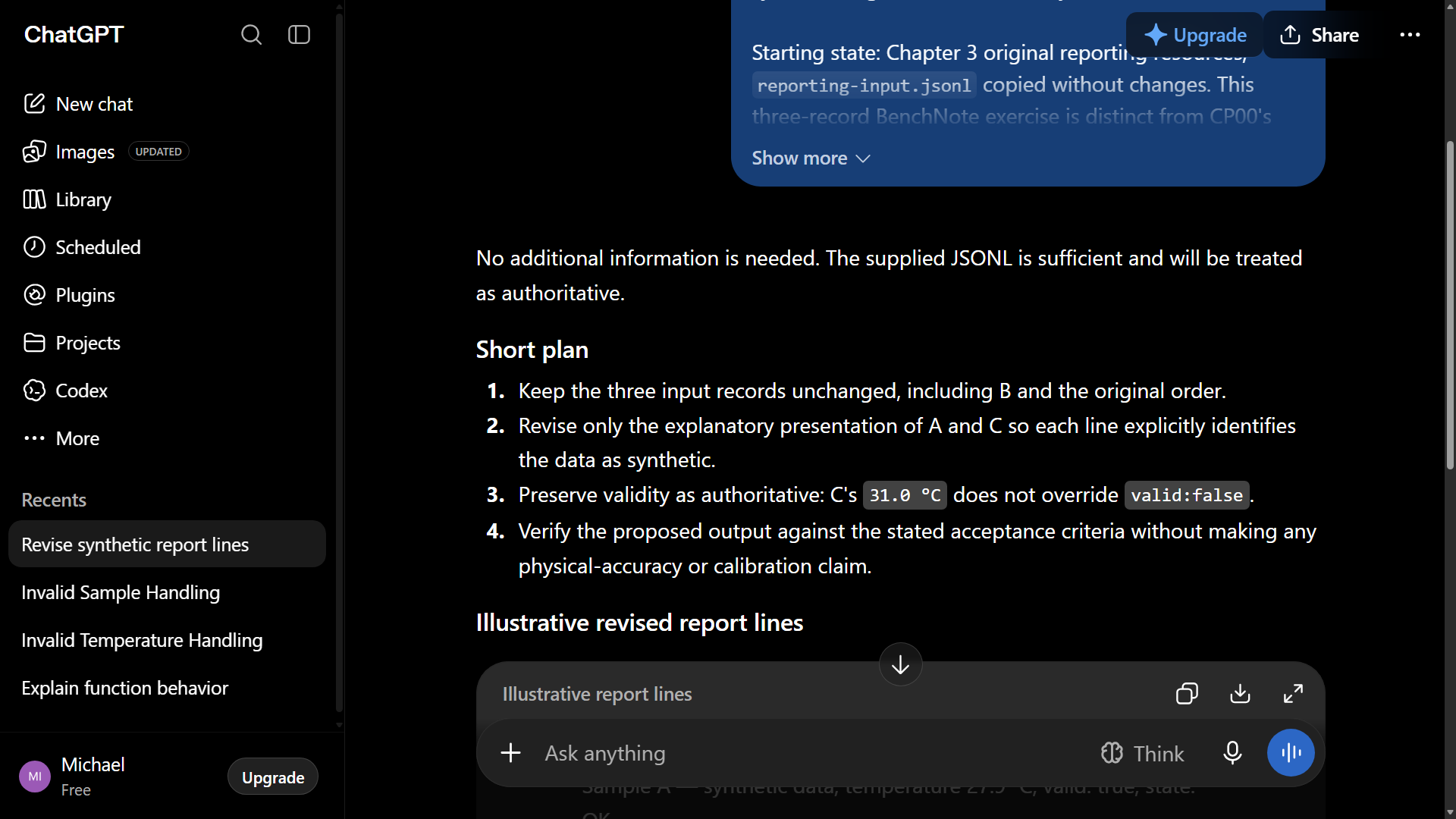
Submit it with the actual relevant resource text, or use the course's original reference response when account access is unavailable. A suitable illustrative plan identifies the report surface, adds the label, compares old and new values, and calls out the need to retain invalid status. It does not install a library or guess a board pin.
Now assess the response. Suppose it proposes a configurable cloud dashboard “for future scalability.” That is outside the brief, even if it could be useful later. Save the idea in a separate future-work note if you want it, and keep the current task bounded. Suppose it changes WARN to ALARM for readability. That violates the state-name constraint. Ask for a correction tied to that criterion.
A short review note might read: “The proposed origin label meets the goal. Reject the state-name change because downstream examples rely on WARN. No commands were executed; the shown lines are illustrative. Next step: apply only the approved report edit and inspect the result.” This note captures a decision another person can follow.
Figures SS03-01 and SS03-02 show the initial and completed briefs. SS03-03 records the actual plan returned during the demonstration and its review. The important difference is visible missing information becoming explicit, not an artificially perfect AI response.
7. Lab LAB03: specify a reporting change
Your independent task is to request an explanatory summary that counts valid and invalid records in this chapter's original resources/reporting-input.jsonl while preserving the original input. Open the actual fixture, identify the records, and count them yourself before asking for help. It contains three original synthetic records with an explicit validity flag; CP00's different two-record log does not define validity. Do not assume a count from this chapter's illustrative two-row table; your release resource is authoritative for the lab.
Create task-brief.md using the worked template. Name the input file, request the summary format, forbid rewriting the fixture, and require the response to distinguish a proposed command from an executed result. Add acceptance criteria for the total count, the valid/invalid split, and the synthetic origin label. Supply the small relevant input to the assistant or analyze the provided reference response.
Save a review beside the brief. Accept or reject each criterion with a reason. Expected observations are a bounded plan or summary, explicit synthetic labeling, and counts traceable to the actual fixture. If a response counts incorrectly, you can still pass the lab by detecting the mismatch and correcting the artifact. The deliverable is a sound brief and justified review, not a record that an assistant was always right.
8. Failure and recovery: unrelated rewrites
If an agent changes several unrelated files, stop further edits and inspect the state. Preserve the candidate result long enough to understand it. Return to the unchanged starter copy for this early lab, or use the later Git recovery techniques when history exists. Do not paste a blanket deletion command into an unfamiliar folder.
Rewrite the brief with the exact permitted file, requested output, and success checks. Ask for a small plan before implementation when the dependency is still uncertain. A restart is successful when the new result is reviewable and the original material remains recoverable. Repeatedly adding “be careful” without clarifying the missing boundary is unlikely to solve the real problem.
Completion checklist
- My brief separates goal, current state, input, constraints, and requested artifact.
- Every path has a named root and every output has an evidence label.
- My acceptance criteria include a normal case and a useful negative case.
- I reviewed the actual response and preserved the starter material.
Review questions with answers
1. Why provide both expected and actual output? Their difference defines the problem. Actual output alone may be valid under a different requirement, while expected output alone hides the symptom and reproducer.
2. Should every brief request a long plan? No. A small, well-understood edit may need only a few steps. Planning is valuable when it exposes ambiguity, dependencies, or scope before a change; length is not the measure of quality.
3. Is asking another model to approve the answer sufficient verification? No. Another model can help find issues, but acceptance still depends on evidence such as a source, inspected diff, independent count, or executed test.
Transfer exercise
Expand the five-line note from Chapter 1 into a complete brief for your own project. Give it to another person, or review it after a break without consulting your original thoughts. Identify the first question they would need answered and improve the brief. You are ready for the workbench when the task has a clear starting state and a result you can recognize.