7. Experiment, Review, and Recover
You will use a branch for a bounded task, reject an unrelated edit, resolve a small conflict, and undo a committed fault without rewriting shared history. Start with Chapter 6 and a separate copy of the supplied Git practice resources. Keep your useful project intact. Recovery commands affect different kinds of data, so we name the starting state before every example.
The value of an experiment depends partly on your ability to judge and reverse it. An assistant's patch can contain a correct reporting change and an unrelated host sample-value change. Accepting the whole patch because one part looks good confuses those decisions. Git gives you ways to isolate work and inspect exactly what is proposed; your brief supplies the criteria for accepting it.
1. Start one branch for one task
A branch is a named line of development whose reference advances as you commit. A new branch lets you develop a change while keeping a clear reference to the previous line. It is not a second physical copy of every file, and it does not automatically isolate uncommitted working changes. Begin this exercise from a clean, known baseline. Git branching basics
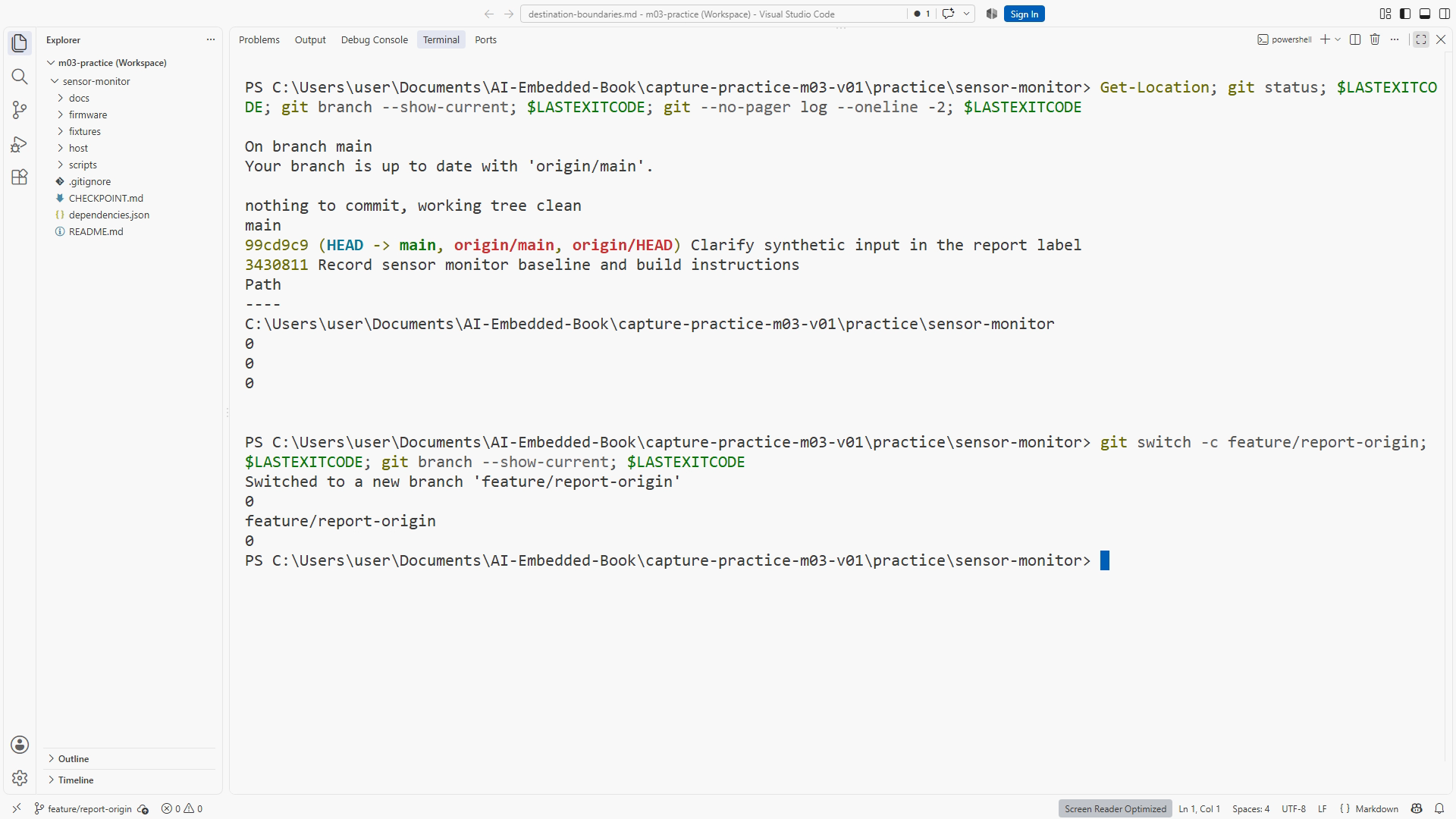
In PowerShell, inside the disposable practice repository:
# Context: PowerShell in the Git practice copy, starting with clean main.
git status
git branch --show-current
git log --oneline -3
git switch -c feature/report-origin
git branch --show-current
The expected branch is now feature/report-origin. If Git says the name already exists, inspect it instead of creating a similarly named branch by guesswork. If status was dirty, preserve and account for those changes first. Creating a branch does not make unexplained edits disappear.
Figure SS07-01 shows the actual baseline and selected branch. Figure D07 shows the later path through review, merge, and a subsequent revert. A revert is a new event in history, so the diagram retains the original mistaken commit rather than erasing it.
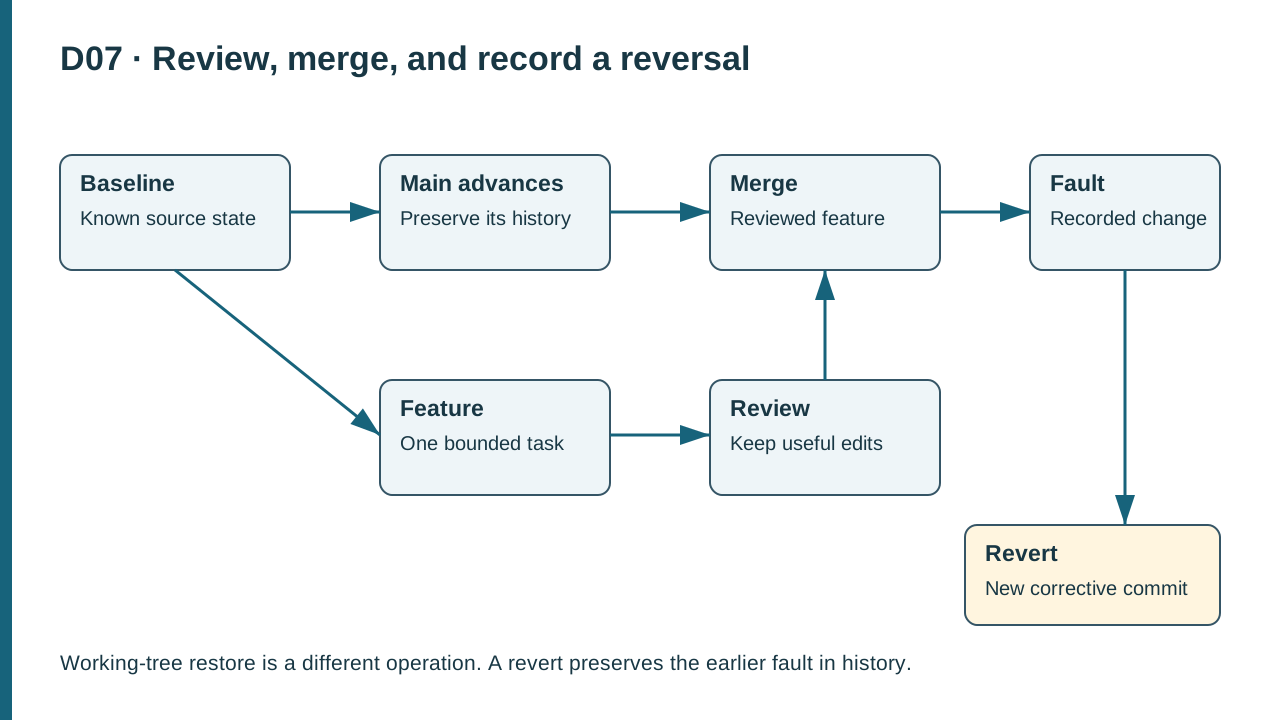
D07. A feature develops from a baseline, is reviewed and merged, and a later fault can be reversed by a new commit while the faulty commit remains in history.
2. Ask for a bounded agent change
Use the Chapter 3 pattern. A suitable task is: “Add a clear synthetic-origin statement to the report documentation. Change only the designated README paragraph. Preserve the fixed host sample, firmware, dependencies, and build commands. Show the diff and distinguish checks actually run from proposed checks.” Give the agent the repository root and relevant requirement.
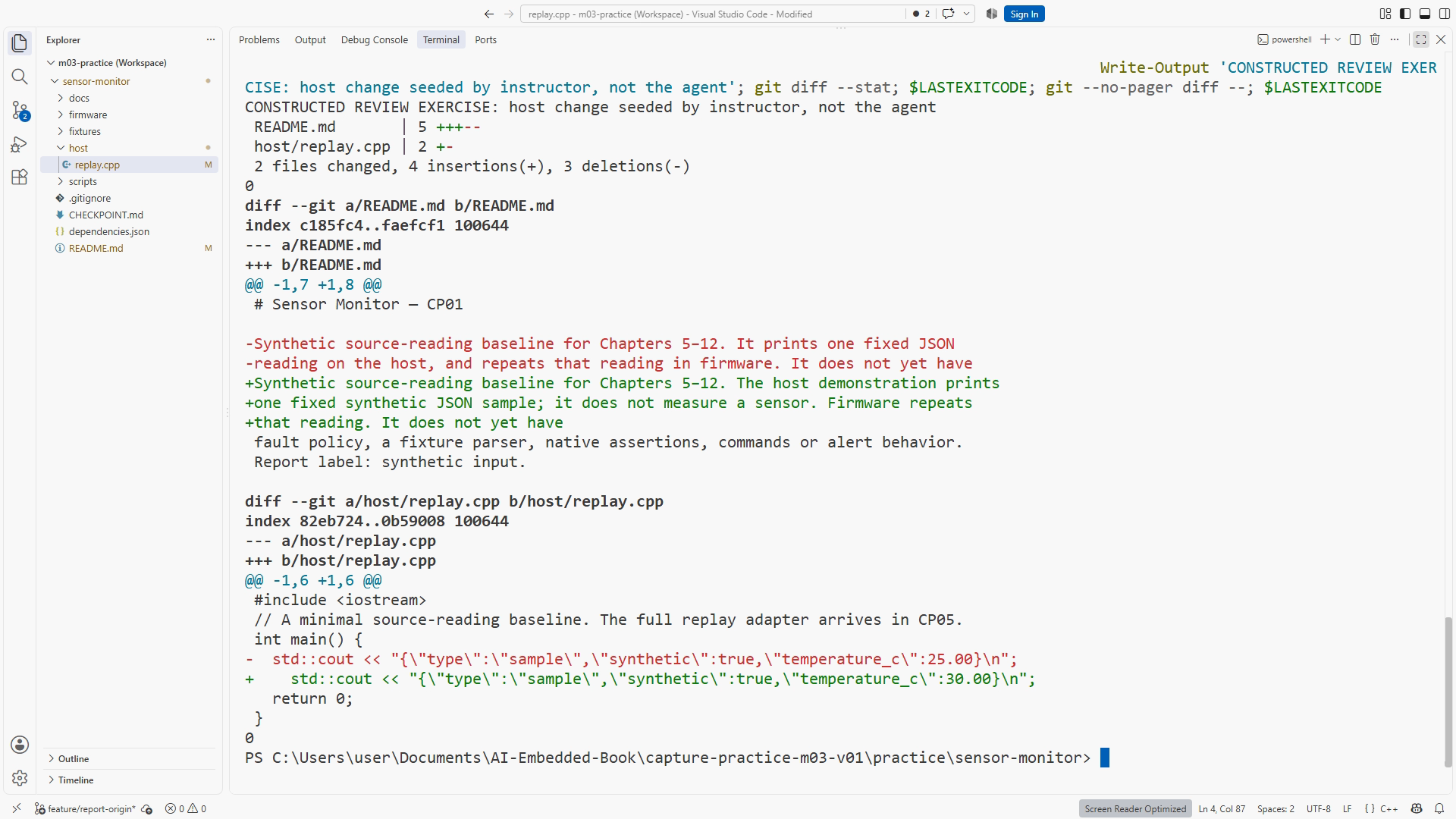
Watch the action record and inspect the resulting files. If the actual agent produces only the requested change, do not pretend it also made the unrelated edit in this lesson. Use the supplied seeded review candidate for the teaching comparison. It deliberately includes an extra fixed-sample edit in host/replay.cpp. Label it as a constructed fault exercise, not as evidence of an agent failure that did not occur.
The seeded review candidate contains two ideas: an intended documentation sentence saying readings are synthetic, and an unrelated change of the fixed host sample from 25.00 to 30.00. CP01 has no threshold policy yet. Both are visible in the diff. The first serves the brief; the second changes behavior without support from the task. The candidate can be partly useful without being acceptable as a whole.
Figure SS07-02 must show the candidate under discussion and identify whether it came from a live agent turn or supplied fault setup. This provenance matters because the reader is learning to inspect evidence, not watching an invented story about an assistant.
3. Review the diff against the requirement
Inspect the changed-file list first, then each hunk. A hunk is a grouped section of changes with context. Ask what behavior each hunk changes and which criterion justifies it. A README-only task touching policy source needs explanation before acceptance. Small does not mean harmless: a one-character comparison can change a boundary case.
# Context: PowerShell on feature/report-origin after the candidate edit.
git status
git diff --stat
git diff
Write a review note with finding, evidence, consequence, and requested correction. For example: “Reject the 25.00-to-30.00 sample change in host/replay.cpp. The task permits a README clarification and preserves the fixed sample. Restore that hunk while keeping the README improvement, then run the CP01 replay.” This is more actionable than “please improve code quality.”
Use the editor to remove only the unrelated candidate change, or apply the supplied correction in the disposable exercise as documented. Inspect the diff again. If a file contains useful and unwanted edits, replacing the whole file from a baseline could discard useful work; inspect individual hunks before choosing that route. Save and review the final candidate before staging.
Run checks proportionate to the result. For a pure explanatory sentence, inspect its accuracy and links. If the host source changed, run the CP01 replay after correction. Its expected fixed JSON sample is documented in README; automated assertions arrive later. Record verification you did not perform. A reviewer should not have to infer test coverage from the word “checked.”
4. Propose a pull request
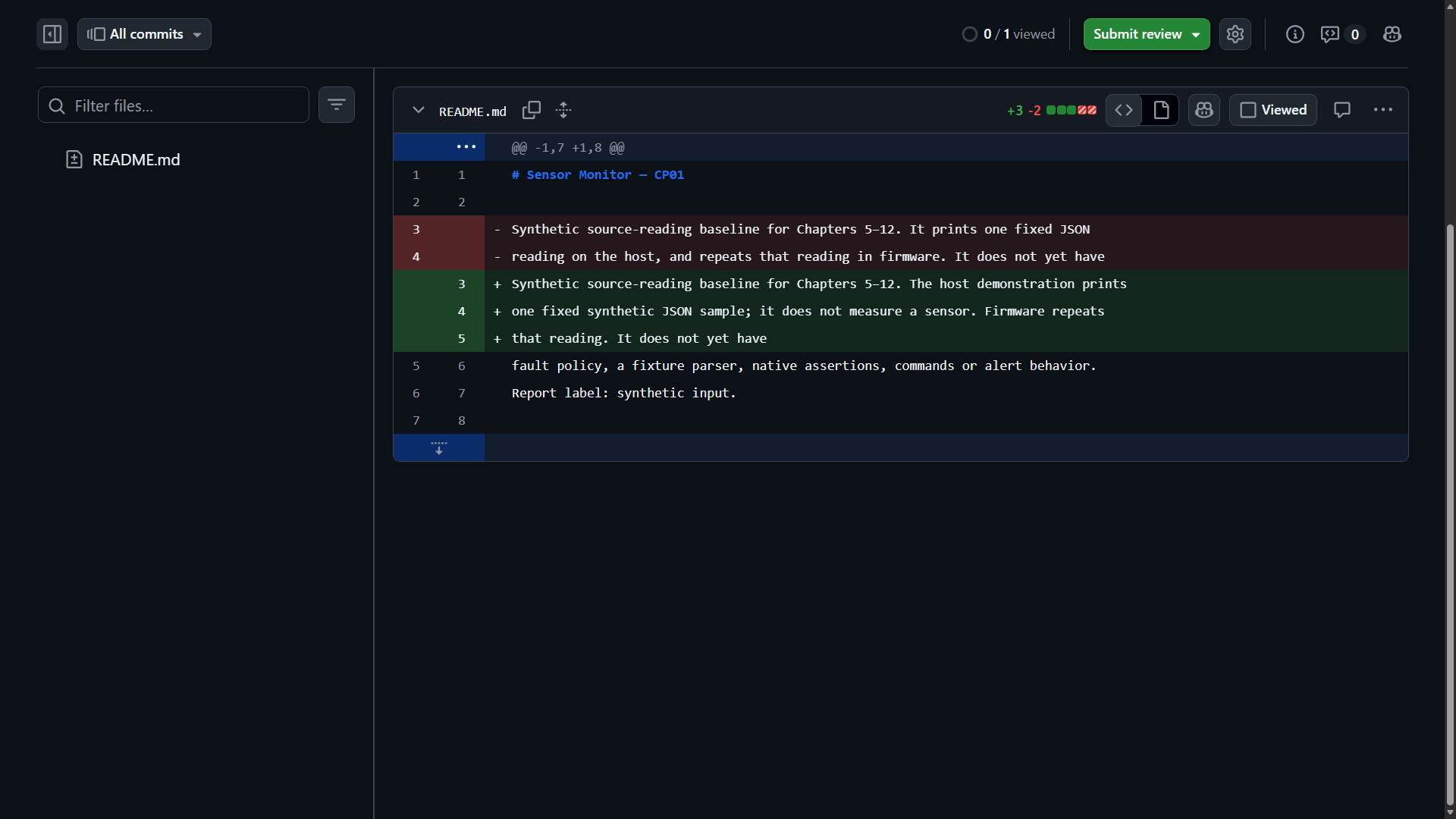
Commit the reviewed task, push the feature branch to your private practice remote, and open a pull request targeting main. Inspect the base and compare branches before creation. In Files changed, verify that the remote proposal matches the local reviewed diff. GitHub documents reviewing changed files and commenting on a pull request. Reviewing proposed changes
A concise description names the problem, new behavior, and actual validation. For this exercise: “The README now explicitly identifies replay inputs as synthetic. Reviewed the wording against the evidence requirement; no physical result is claimed.” Add replay details only if it ran. If this is a solo exercise, use a written self-review; do not claim another person reviewed it.
Figure SS07-03 shows the real private pull-request diff. You can practice the local review while account access is unavailable, but keep the remote exercise pending until you perform it. A local diff is not evidence that a pull request was opened or merged.
When the proposal is ready, integrate it using the practice repository's chosen merge method and update your local branch through the documented synchronization path. Preserve branch and commit references in your notebook. We do not need to rewrite earlier commits to produce a readable learning history.
5. Worked example: create and resolve a text conflict
Use a fresh disposable clone of the supplied history bundle. It contains generic manufactured teaching history, not authoring history. The two prepared conflict branches both change the CP01 README line. Work from the folder holding your downloaded sensor-monitor-history.bundle:
# Context: PowerShell in the learner download folder; choose a new destination.
git clone .\sensor-monitor-history.bundle chapter-07-conflict
Set-Location .\chapter-07-conflict
git switch -c resolve-origin origin/practice-conflict-left
git status
git merge origin/practice-conflict-right
git status
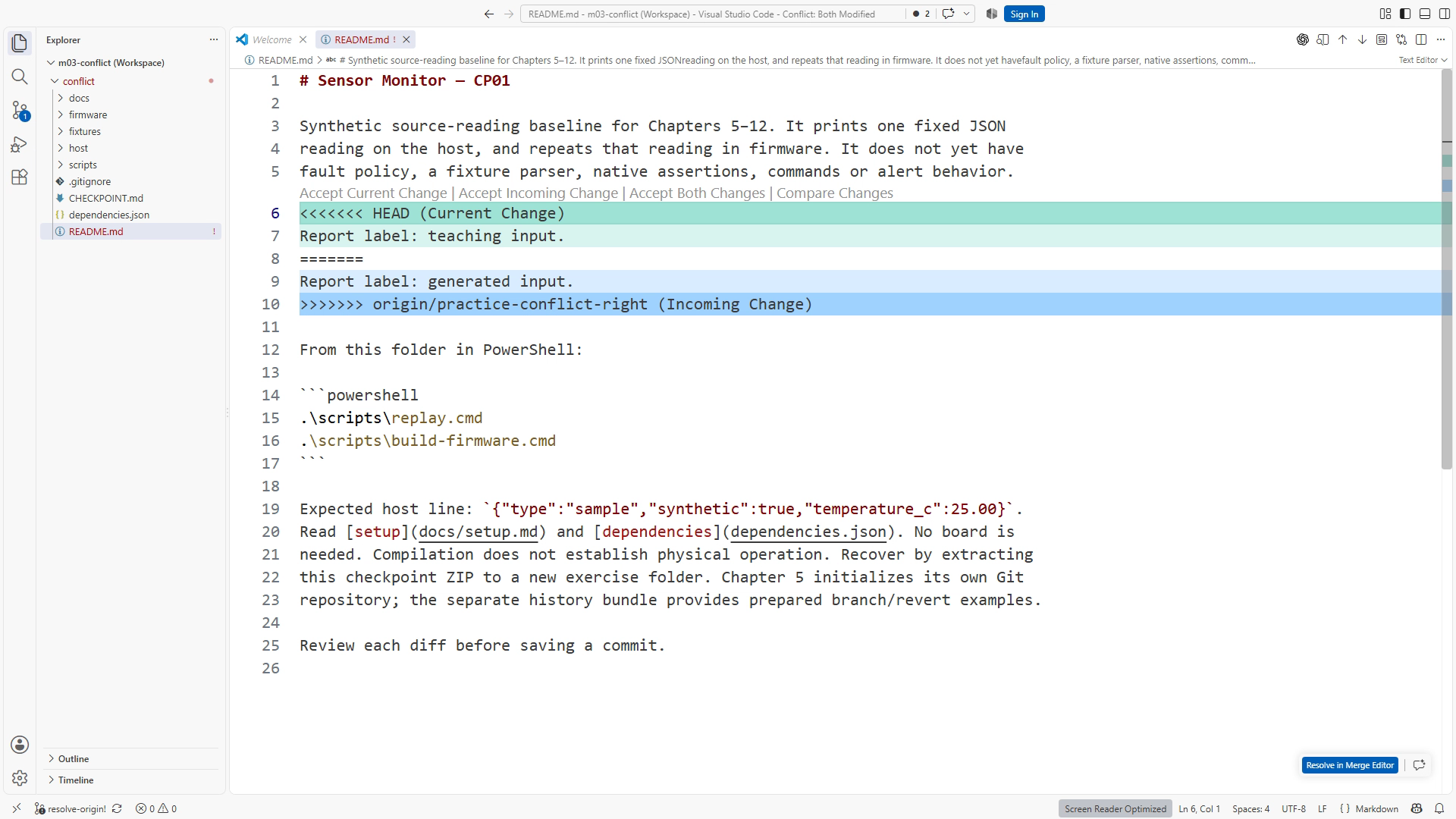
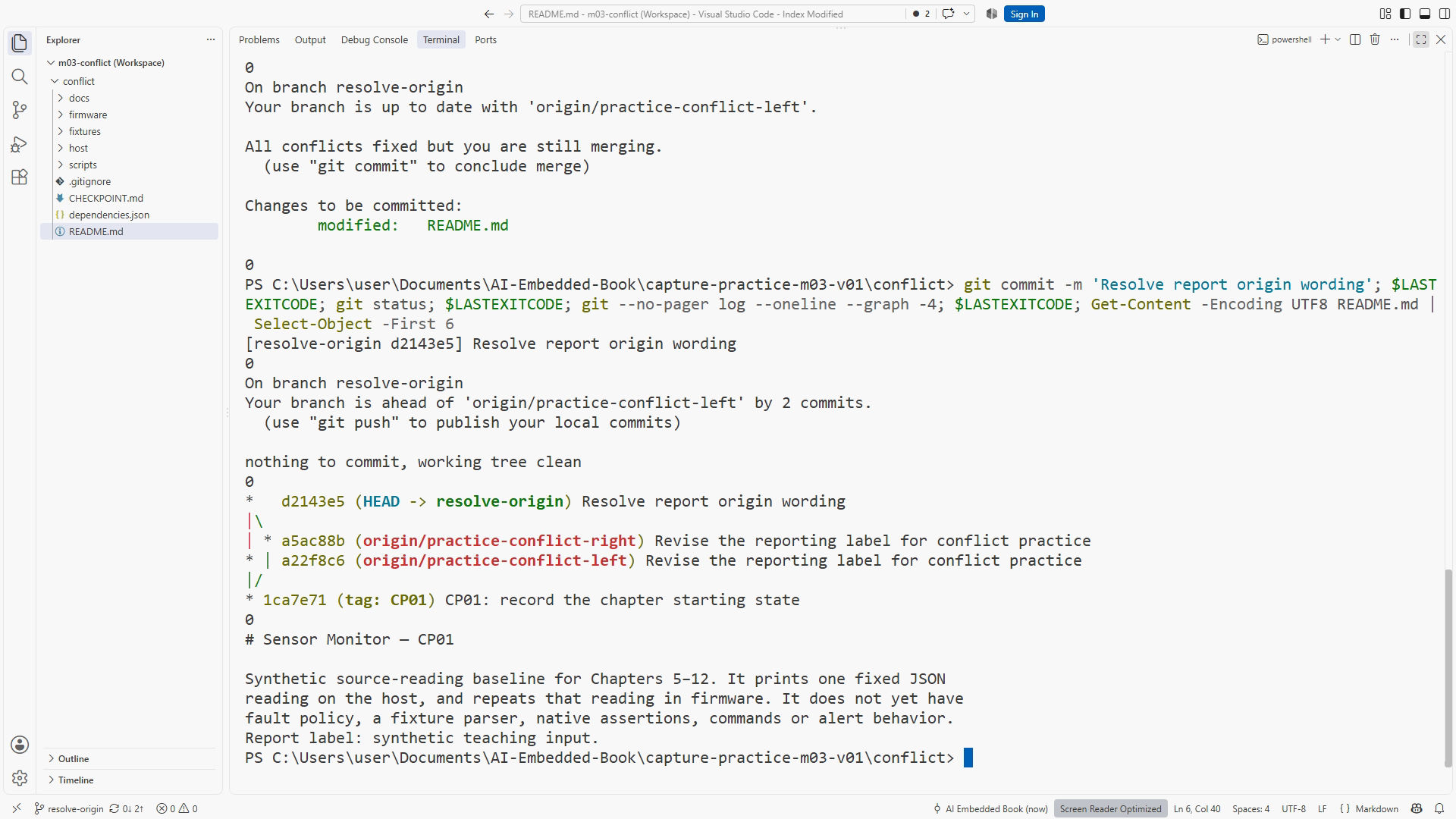
The left branch says Report label: teaching input. and the right says Report label: generated input. Neither is a physical observation. Read both against the requirement to preserve explicit synthetic origin.
The expected result is a conflict in README. Exact output wording varies. Open the file; Git's conflict markers separate the competing text. The upper portion is the current branch's contribution in this ordinary merge, and the lower portion is the branch being merged. Read the labels and context rather than treating “current” as a synonym for “correct.” git merge reference
The intended resolution is a deliberate third sentence: Report label: synthetic teaching input. It preserves the useful intent of both changes. Remove all conflict markers and rejected text. Preview the README to ensure it reads normally. Then stage and complete the merge:
# Context: same repository, after editing the complete resolution.
git add README.md
git diff --cached
git status
git commit -m 'Resolve report origin wording'
git status
Staging marks the path resolved; it does not judge the prose. You supply that judgment. Search the resolved file for leftover marker lines and read the complete paragraph. Figures SS07-04 and SS07-05 show the real competing text and verified resolution. Clean status after the merge is one observation; correct resolved meaning is another.
If you are not ready to resolve, use git merge --abort in this clean-start exercise and inspect status. The starting state matters because aborting a merge may not reconstruct unrelated edits that existed beforehand. Preserve work before entering a complex operation rather than expecting a recovery command to guess your intentions.
6. Restore an uncommitted edit deliberately
In a separate disposable restore example with an existing clean commit, change a harmless README sentence and do not stage it. Inspect git diff -- README.md. If you decide to discard that edit completely, run:
# Context: disposable restore example; only the unwanted README edit is unstaged.
git restore -- README.md
git diff -- README.md
git status
By default this restores the working file from the index. Because this example began clean and had no staged change, that index matches the baseline commit. The unwanted uncommitted edit is discarded. This differs from git restore --staged, which changes staging selection while preserving the working file. git restore reference
Before restoring, copy out text you may want to keep or commit useful work on an appropriate branch. Do not use a whole-directory restore when you intend to discard one known file edit. If you staged a useful version and then edited again, understand both snapshots before restoring either. The command is precise when the starting state is precise.
7. Revert a committed fault
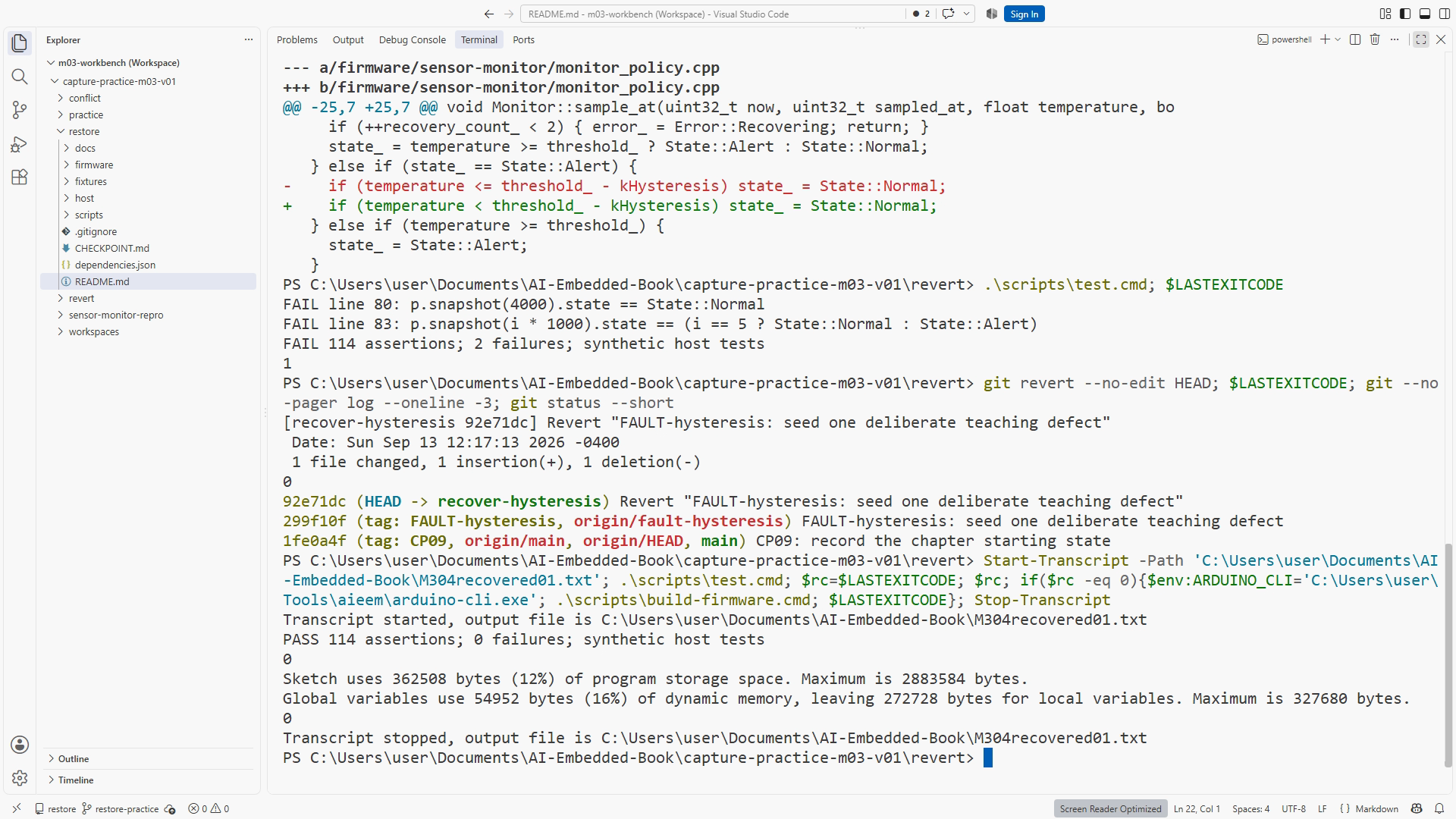
Use another clone of the supplied bundle and create a branch from FAULT-hysteresis. This prepared later-project checkpoint includes the tests needed for a historical recovery exercise. You do not need to implement its capstone policy now. Its isolated bad commit uses < where the requirement calls for <= at the clear boundary of 27.0 °C. This differs from the introductory 28.0 °C warning-entry example.
# Context: PowerShell in the download folder; use a separate new destination.
git clone .\sensor-monitor-history.bundle chapter-07-revert
Set-Location .\chapter-07-revert
git switch -c recover-hysteresis FAULT-hysteresis
git status
git log --oneline -4
git show --stat HEAD
git show HEAD
.\scripts\test.cmd
Save the actual failing boundary check before recovery. If compilation or executable startup fails instead, diagnose that separately; it is not a reproduced policy failure. No physical alarm failure is implied.
Identify the exact seeded-fault commit from the log. In this prepared exercise it is HEAD, the current commit. If yours differs, stop and identify it rather than copy a hash from the book. Then create a revert:
# Context: clean fault exercise; HEAD has been verified as the isolated bad commit.
git revert --no-edit HEAD
.\scripts\test.cmd
.\scripts\build-firmware.cmd
git log --oneline -3
git status
git revert creates a new commit reversing the selected change. The bad commit remains visible, and the new commit explains its reversal. That is useful for shared history because others can follow what happened without earlier references being silently replaced. Conflicts can still occur when intervening changes overlap; this beginner exercise uses an isolated fault to expose the basic operation. git revert reference
Expected observations are a failing pre-revert test, a new revert commit, and a passing post-revert test for the same fixture. Save actual results. Figure SS07-06 shows those results and history. Reverting does not prove universal correctness; it removes that change and lets the relevant regression check establish restored behavior.
8. Lab LAB07: review and recover
Submit a review note rejecting the unrelated candidate edit, a resolved conflict README, and before/after evidence for the seeded fault. Keep each exercise in its designated disposable repository so restoring an uncommitted sentence cannot destroy work you meant to revert as history.
For each recovery, write four short fields: starting state; intended data to preserve; chosen command or edit; observed result. For restore, the intended loss is the explicitly unwanted uncommitted edit. For revert, preserve existing history plus a corrective commit. For conflict resolution, preserve both useful meanings and remove the markers.
You pass when final content meets the requirement, relevant tests show the intended recovery, and useful work remains accounted for. A blank diff alone is insufficient: you might have discarded the requested feature along with the fault. Compare final behavior with the original brief.
For a final self-check, explain the recovery before touching the keyboard. If your explanation is “get back to where it worked,” ask which file version, which commit, and which useful work must remain. That small pause turns a vague rescue attempt into a reviewable operation. You should be able to predict whether the command changes working content, staging, or history.
Completion checklist
- I began each exercise from a known state in the correct practice repository.
- I reviewed changes by purpose and rejected the unrelated edit.
- I resolved the README conflict for meaning and removed all markers.
- I distinguished discarding an uncommitted edit from reverting a commit.
- I reproduced the seeded failure and saved actual recovery evidence.
Review questions with answers
1. Does a branch protect every uncommitted edit? No. Branches name history; working changes may remain present while you switch when Git permits it. Start clean or preserve and account for edits explicitly.
2. Why not accept both conflict sides automatically? Both fragments may duplicate or contradict each other. Resolve the intended meaning, inspect the finished document or program, and run relevant checks.
3. Why use revert for a shared committed error? It records a new corrective event while retaining existing history. Restore primarily addresses file contents and staging; it is not a substitute for an explicit historical reversal.
Transfer exercise
Choose a small change you expect to make soon. Write its branch purpose, review criteria, and recovery plan before editing. Name the state you would preserve if the experiment failed. This is the foundation for using an agent confidently on a project whose history matters.