10. Write AGENTS.md for an Embedded Project
What you will be able to do
You will write concise project guidance, check its discovery scope, and test whether a fresh Codex session follows it during a bounded task. Start with CP02, the context documents from Chapter 9, and working project replay/build commands. Your deliverable is CP03-style guidance plus a behavior record. A successful result requires observable actions; the agent's summary of its instructions is only a diagnostic clue.
A fresh CP03 download contains the project brief and hardware reference, with replay/build commands but no assertion suite. Your own continued Chapter 9 copy may also contain the additional notebook documents you wrote. Link only files present in the working copy: use docs/project-brief.md for the CP03 behavior task, and add requirements/decision/evidence links when those populated files exist.
Guidance that survives a conversation
A good engineering brief answers what to do now. Project instructions answer what usually matters here. Without that distinction, every request grows into a repeated introduction: use the shared policy, consult the exact board reference, keep synthetic output labeled, run the maintained tests, and report the evidence. Repetition is tiresome and makes it easy to omit a constraint when the task becomes interesting.
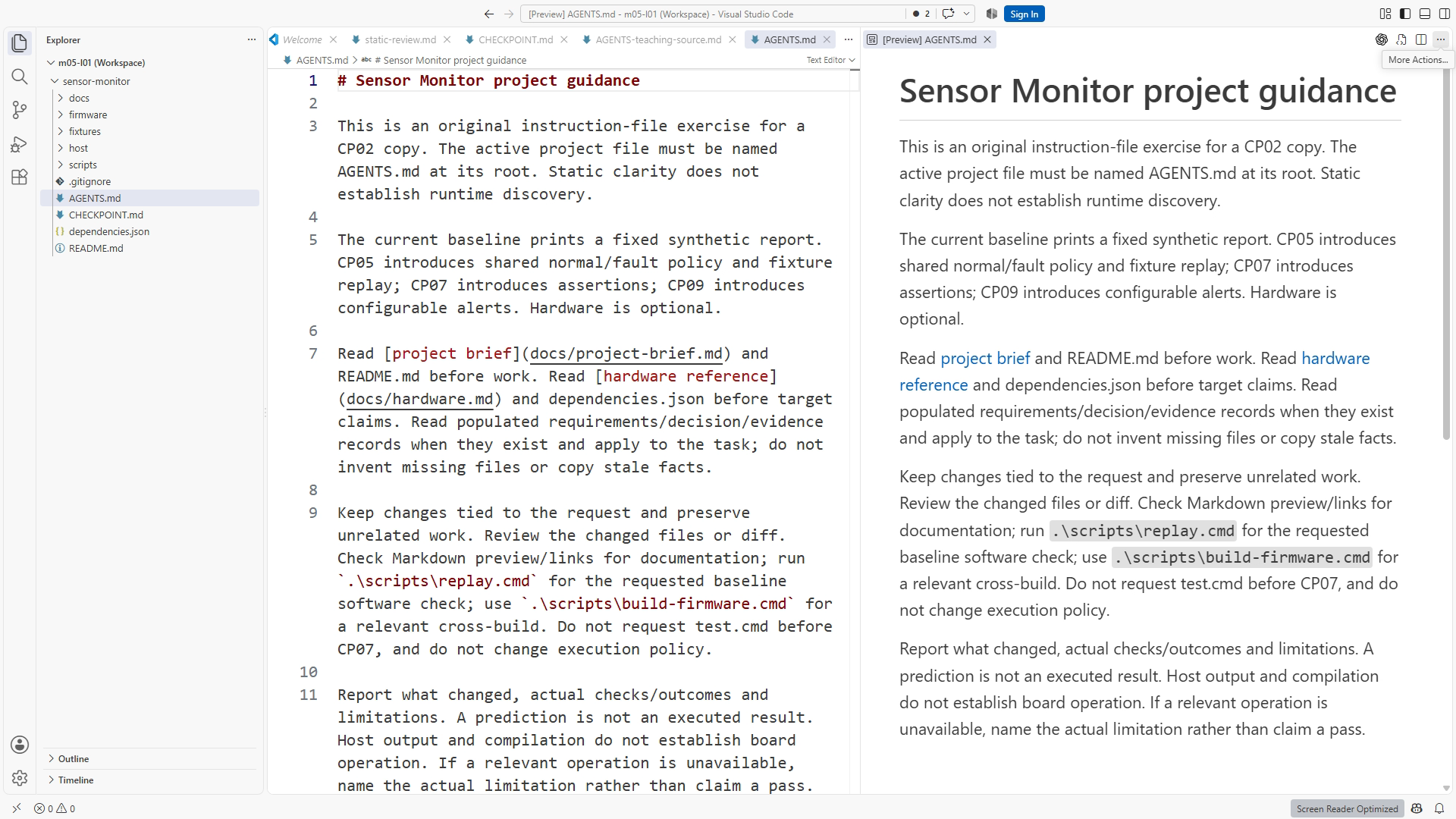
AGENTS.md gives those recurring expectations a maintained home in the repository. For Sensor Monitor, it can explain the project purpose, direct the agent to current requirements and hardware facts, identify the supported validation commands, and define what a completion report must contain. The current task still supplies the specific requested change. The reference documents still hold detailed engineering information.
Think of the file as a signpost with working agreements. It should help the agent choose the right files and checks without copying the whole repository into persistent instructions. A ten-page hardware manual inside AGENTS.md becomes another manual to keep synchronized. A short instruction to read docs/hardware.md before changing a board-specific setting preserves one source of truth.
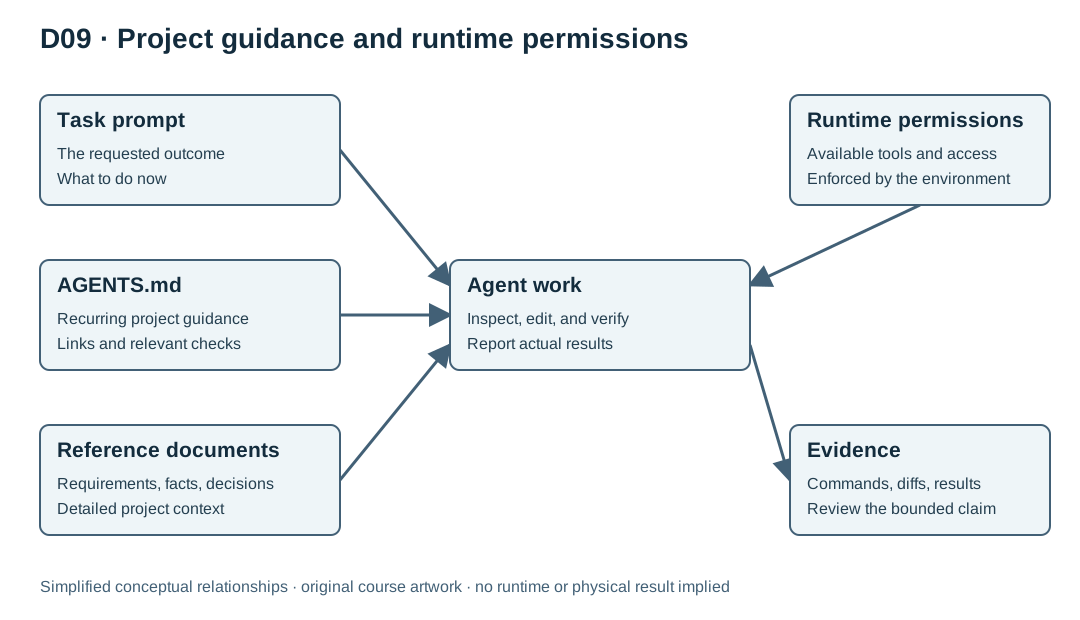
Guidance does not grant capability. A sentence saying “run the compiler” cannot install a missing compiler, authorize a blocked action, or make a tool available. A sentence saying “do not access other folders” is useful intent but is not a filesystem security boundary. Actual runtime permissions, approval policy, and available tools govern what operations the environment can perform. Figure D09 separates task prompt, project guidance, reference files, and runtime controls.
Filename, location, and discovery
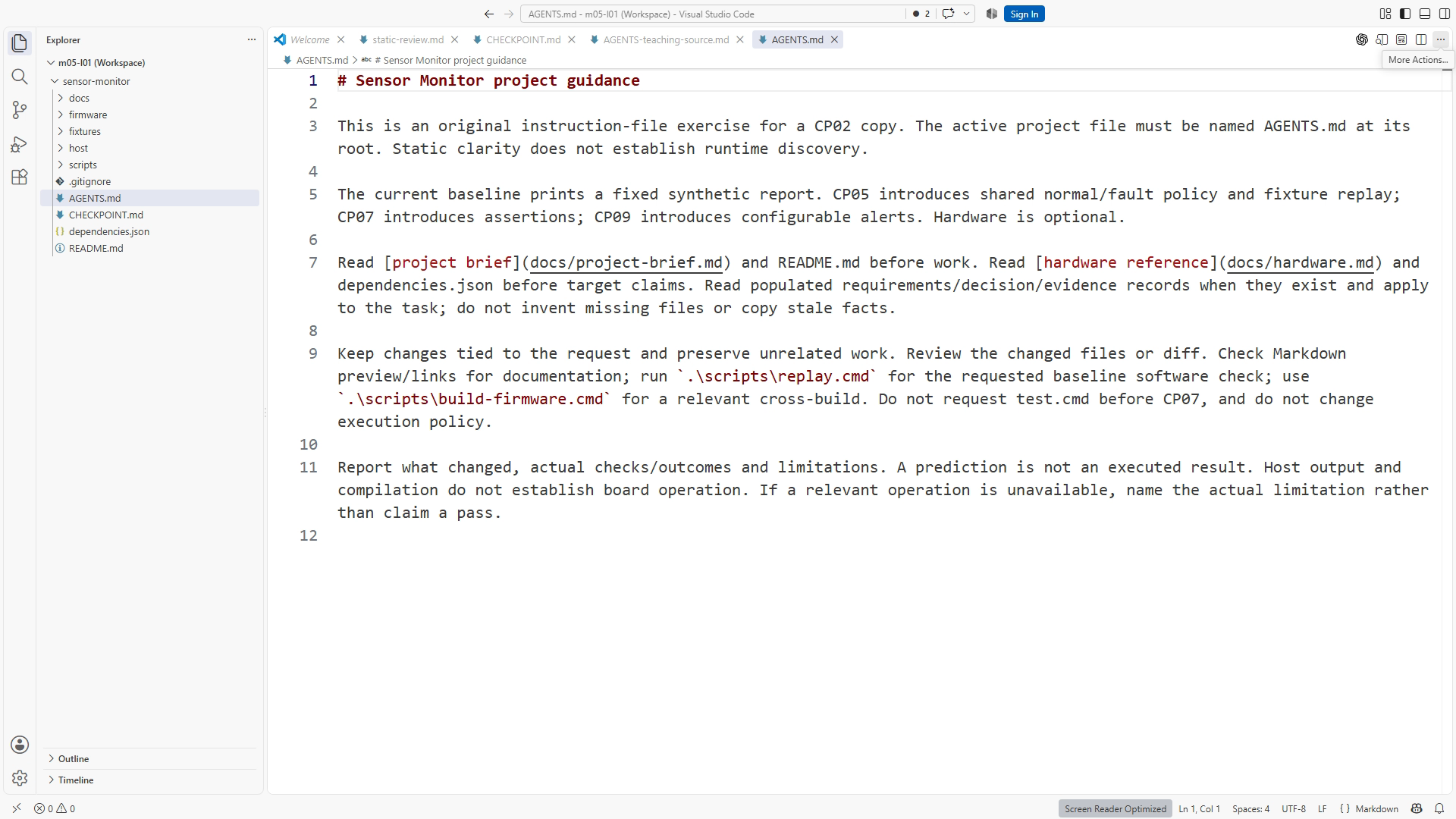
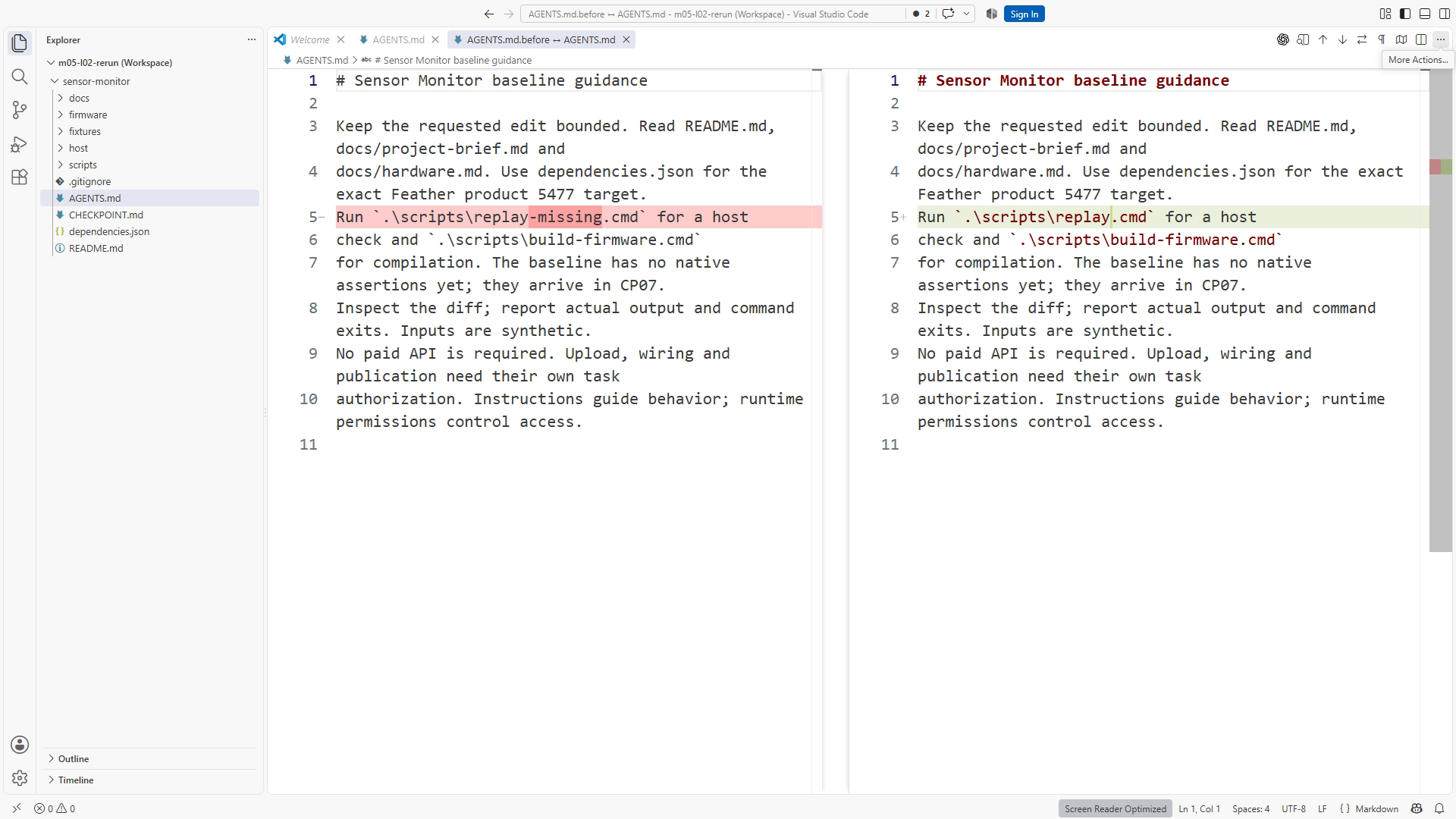
Use the exact filename AGENTS.md at the Sensor Monitor project root. Confirm the editor has not created AGENTS.md.txt, and do not confuse it with .agents/skills, which has a different purpose in Chapter 11. Inspect the folder that the agent actually opened. A correct file in a neighboring checkout is irrelevant to the active task.
The official OpenAI AGENTS.md guide, checked September 12, 2026, describes Codex's startup instruction chain: global guidance is considered first; project discovery walks from the project root toward the current working directory. At each directory it selects at most one applicable instruction file, preferring AGENTS.override.md over AGENTS.md, followed by configured fallback names. More local guidance appears later. Empty files are skipped, and the combined project-document budget is 32 KiB by default. Restart or begin a new run after an instruction change when verifying the chain.
These are documented Codex rules, not a universal promise about every AI editor. The course uses a root file to keep the initial lesson simple. If the installed interface reports a different active workspace or does not show the intended file, diagnose that condition before assessing whether the wording is effective. A discovery failure and an instruction-quality failure need different repairs.
Avoid changing global settings merely to complete this exercise. Global preferences can affect unrelated projects, and an existing override may explain an unexpected result. Inspect the relevant scope with the available interface, preserve existing configuration, and keep the exercise local. SS10-02 focuses on the exact filename and location. The laboratory records the installed interface and version so future readers know which behavior was actually tested.
Write rules that tell an engineer what to do
“Write excellent embedded code” expresses a preference without defining a reviewable action. “After changing shared policy or parser code, run the host-test wrapper and report its exit result” is operational. It names the trigger, the action, and the evidence. Instructions work best when a reviewer could inspect a completed task and decide whether each expectation was satisfied.
Similarly, replace “be careful with hardware” with a boundary tied to this project: the required path uses synthetic host input and firmware compilation; physical upload and wiring belong to a separately chosen optional lab. The purpose is to prevent a software result from being described as a board measurement and to avoid accidental expansion of the requested task.
Specify a starting directory for commands. Use the maintained wrappers rather than embedding compiler flags in several documents. Explain which checks apply to which changes. A wording-only edit to the README may require link and preview checks; changing C++ policy requires stage-appropriate checks, including host tests once available; changes affecting firmware integration need the cross-build. Requiring every expensive check after every punctuation fix creates noise and makes meaningful omissions harder to notice.
Use strong requirements sparingly. If every sentence begins “always” or “never,” ordinary exceptions become contradictions. “Run relevant checks before claiming completion; report any check you could not run” is more useful than “always run all tests” when a task cannot access the required dependency. Reporting a limitation is part of a truthful completion report, not permission to silently omit required work.
Worked example: a concise root file
The following is an instructional pattern using the reference project's paths. Compare it with the maintained AGENTS.md shipped in your checkpoint before making an edit. The released file is the source of truth for the exact command set.
# Sensor Monitor project guidance

Read the stage README: CP01–04 print a fixed synthetic report;
CP05 adds shared policy and fixture replay. Firmware is cross-compiled
for a documented example target; physical operation is unverified.

## Start here

Read README.md and docs/project-brief.md for the current stage.
Read docs/requirements.md when that populated document exists.
Read docs/hardware.md before changing board-specific settings.
Read docs/decisions.md and docs/evidence.md when those populated files exist.

## Work and validation

Keep changes bounded to the requested outcome and inspect the diff.
Run commands from the project root using the maintained scripts.
At CP07 or later, after shared C++ changes run scripts/test.cmd.
At earlier checkpoints, use the available replay/build checks.
After firmware integration changes, also run scripts/build-firmware.cmd.
Use scripts/replay.cmd; name the synthetic fixture at CP05 or later.

## Finish

Report changed behavior, relevant checks, actual results, and limitations.
Keep expected outcomes separate from observed output.
Do not describe host replay or a build as physical board verification.
Physical wiring and upload are outside the required core exercise.
This pattern is intentionally small. It does not define a new agent, launch a subagent, or introduce a new access-control system. It also does not attempt to anticipate every future task. Read each line and ask what recurring error it prevents. If you cannot identify one, the line may belong in an explanation rather than in persistent guidance.
At CP03, the available Windows replay invocation is:
.\scripts\replay.cmd
The firmware wrapper is separate:
.\scripts\build-firmware.cmd
Use these with the supplied reviewable wrappers and documented setup. The current Windows wrappers configure their process environment without changing PowerShell execution policy. At CP07 and later, .\scripts\test.cmd supplies host assertion tests as well. If execution fails, preserve the actual message and resolve the demonstrated environment issue. Adding “ignore restrictions” to Markdown does not fix a missing dependency or grant authorization.
Keep detailed facts in their own documents
Suppose the hardware reference changes because a source check resolves a board variant. If AGENTS.md, README, handoff, and three prompts each contain a copied target string, all five copies can become stale. Prefer a single hardware reference and a maintained build wrapper, with instructions directing the agent to both when relevant.
The same principle applies to requirements. Persistent guidance should say where behavior is specified, while the requirement states the exact boundary. Otherwise, a task that legitimately changes a threshold can conflict with an old number embedded in the guidance. You want a reviewer to see that the requirement changed deliberately, not to spend time discovering an invisible duplicate rule.
This separation also makes a fresh-session test more informative. If the prompt repeats the entire requirement and every command, success may show only that the agent followed the prompt. A test that asks for a bounded change while relying on repository guidance can reveal whether the signposts actually work. You can then inspect the file reads, chosen commands, and final evidence report.
Nested rules: use only when a real scope differs
A larger repository may contain firmware, a web interface, and an unrelated tool with different validation commands. Local guidance can be useful there. Sensor Monitor is small, so begin with one root file. Adding nested instruction files merely to demonstrate sophistication makes it harder to know which rule applies.
If you later need a nested rule, document its reason and test from the intended working directory. Do not assume that opening a deep file means the current directory has changed. Identify the actual task scope before reasoning about discovery. A rule in an unused sibling directory does not automatically belong to the active chain.
When two instructions conflict, remove the accidental disagreement at its source if possible. For example, root guidance that says “use the maintained test wrapper” and a stale local note that says “skip tests to save time” undermine the workflow. Diagnose whether the local file is a deliberate specialization or obsolete guidance. Preserve a useful distinction; delete or revise redundant contradictory wording in the exercise copy.
Verify behavior, not reassurance
Begin with a diagnostic request such as: “Identify the project instruction sources and the documents relevant to a shared policy change. Do not edit files.” Compare its response with the actual folder and files. This can reveal a missing instruction file or a surprising override. It is not yet a successful behavior test.
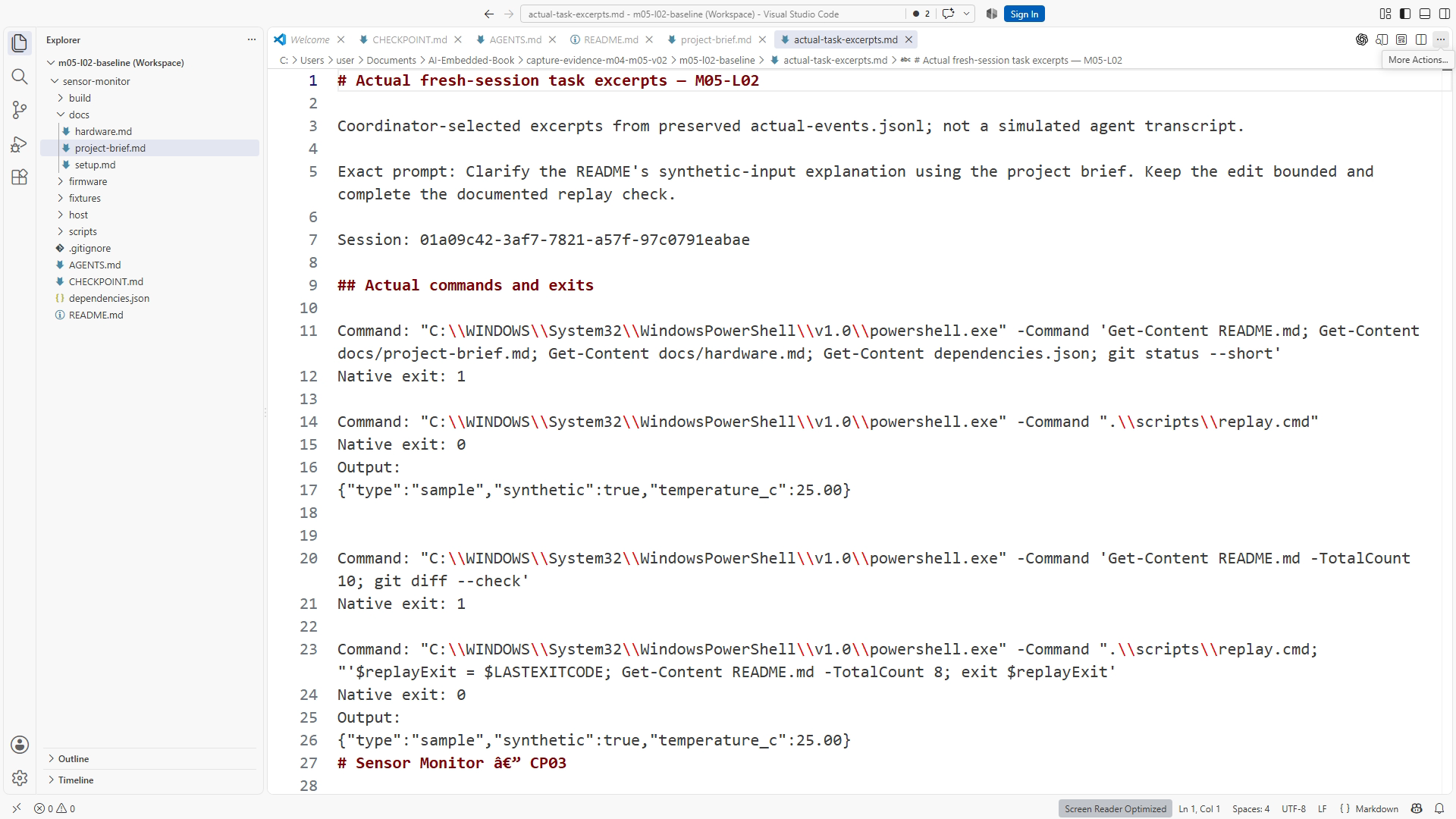
For the real test, use a new session and a small recoverable task. At CP03, ask it to clarify the README's synthetic-input explanation using the project brief and complete the documented replay check. Do not paste the command into the task. The intended sequence is context inspection, a bounded documentation edit, diff review, actual replay, and an accurate result report. At CP07 or later, adding a meaningful test for an implemented behavior is an alternative; keep that later task separate from the CP03 case.
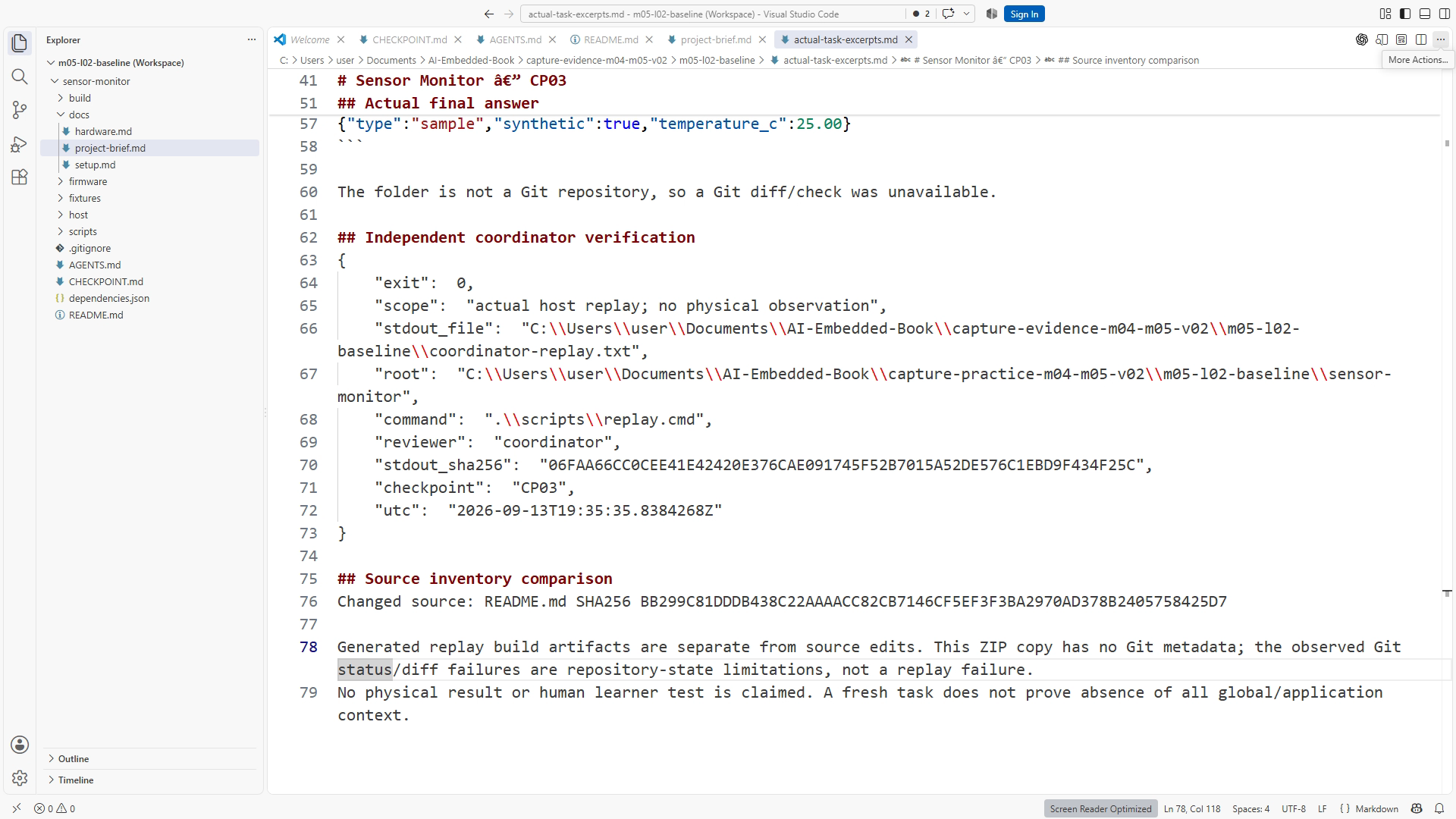
Do not score a particular sentence style. The agent may explain the work differently and still satisfy the engineering outcome. Score observable decisions: correct requirement, appropriate scope, actual command, valid result interpretation, and preserved unrelated files. An announced plan to run tests is not execution. A final claim needs a corresponding command/result or saved evidence record.
Save the prompt, checkpoint, interface version, instruction-file identity, actual observations, changed-file list, commands/results, and verdict. SS10-03 shows the fresh task; SS10-04 shows command use. If the run fails, keep the record and state the cause that the evidence supports. This is an evaluation of a workflow, so an honest failed test is useful material for improving it.
LAB10: test a fresh session
Allow 40–60 minutes, excluding account or dependency waiting. Extract CP03 into a new exercise folder. Preserve your normal project and record the starting README and instruction file before the agent begins. Use a bounded reporting-documentation task; the CP03 exercise does not require later capstone features or assertion tests.
- Read the root
AGENTS.md, README, project brief, and validation wrappers. Identify the instructions relevant to source-grounded documentation and replay. - Start a genuinely new task or session in that exercise root. A continued conversation carrying your previous explanations is not the intended test.
- Submit: “Clarify the README's synthetic-input explanation using the project brief. Keep the edit bounded and complete the documented replay check.”
- Observe the actual work. Record whether it consults the relevant references, confines the documentation edit, uses the documented check, and interprets the result accurately.
- Independently inspect the diff and the replay output. Preserve your evidence outside the source files under review so a log update does not obscure the code change.
- If guidance was not followed, diagnose discovery, wording, conflict, or missing capability. Make the smallest justified repair and repeat in another fresh session.
Submit the final guidance, the task record, and the independent review. A passing verdict requires behavior evidence. If your account reaches a limit or the tool cannot execute, label that run blocked or incomplete and use the supplied reference materials for continued reading; do not convert a static inspection into an observed pass.
Failure and recovery: broad guidance produces a broad edit
Imagine that the guidance says “Improve the project whenever you see an opportunity.” During the README clarification, an agent reorganizes unrelated files. The result may look polished but becomes harder to review. In the exercise copy, inspect the changes and preserve any work you need before returning to the documented start. Replace the broad sentence with a bounded expectation: keep edits tied to the requested outcome and report worthwhile unrelated suggestions separately.
Repeat the same task in a fresh session and inspect whether the scope improves. Do not infer causation from one attractive response alone. The repair is supported when the changed wording addresses the observed ambiguity and the repeated task meets the acceptance criteria. If the broad edit continues, investigate other active instructions and whether the task itself invites expansion.
Another failure is an instruction to run a command that no longer exists. This is a maintenance defect, not evidence that the agent is disobedient. Open the referenced path, compare it with the current scripts, correct the guidance, and repeat the relevant test. SS10-05 records the repaired guidance and rerun behavior without pretending the initial attempt succeeded.
Completion check and review answers
Complete the chapter when the file is concise, correctly located, internally consistent, linked to current references, and supported by a fresh-session behavior record. If execution remains unavailable, the document can be ready while the behavior gate remains open. Keep those statuses separate.
Is AGENTS.md access control? No. It is guidance. Runtime permissions and approvals control actual operations; the file cannot grant capabilities or securely fence off data.
Does it create a subagent? No. It describes project expectations for the agent reading it. Agent definitions and delegation are separate capabilities.
Why start a fresh session? A continued conversation can carry instructions that hide discovery defects. A fresh task better tests whether repository guidance supplies what is needed.
Is an instruction summary sufficient evidence? No. It can diagnose discovery. A behavior test must show the relevant actions and results during a real task.
What should happen when a required check cannot run? The task should report the exact limitation, retain the evidence, and avoid a passing claim. Resolve the environment or repeat the check later.
Transfer to another project
Select three expectations you repeat in your own coding requests. Convert each into a trigger, action, and evidence requirement. Put detailed facts in referenced documents. Test one small task in a fresh session without repeating the commands in its prompt. The result gives you a practical measure of whether the guidance reduces repeated explanation while preserving review quality.
Optional deeper note: maintain a tiny regression set for project guidance after substantial tool or instruction changes. Include one routine code task and one documentation-only task. The second case checks that the guidance does not turn a harmless wording correction into unnecessary broad work. Evaluate the finished artifacts and actual actions rather than rewarding particular phrases.
Sources and figures
Host-specific discovery guidance: OpenAI AGENTS.md documentation, accessed September 12, 2026. The project's actual instruction and command files govern its released examples. Figures: SS10-01 guidance content, SS10-02 location, SS10-03 fresh task, SS10-04 observed command, SS10-05 repair/rerun, and D09 guidance versus reference context and permissions. This chapter defines the test; only the accompanying actual run record can establish its result.