M04-L04 — Record decisions and test evidence
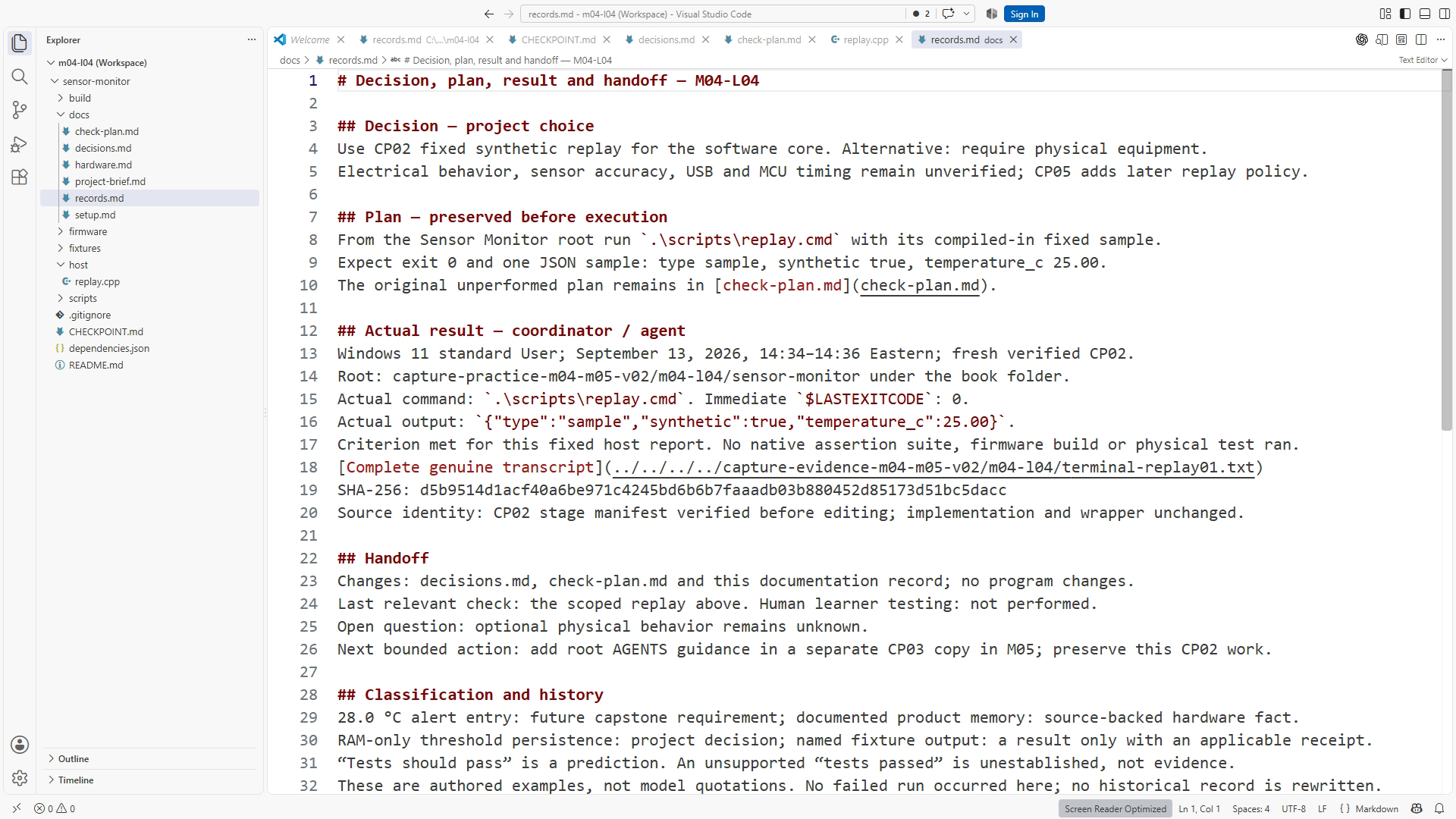
Produce a decision record and a result record that cannot be confused with each other. Start with the linked CP02 documents. You will define an expected check, inspect actual evidence when available, and write a concise handoff.
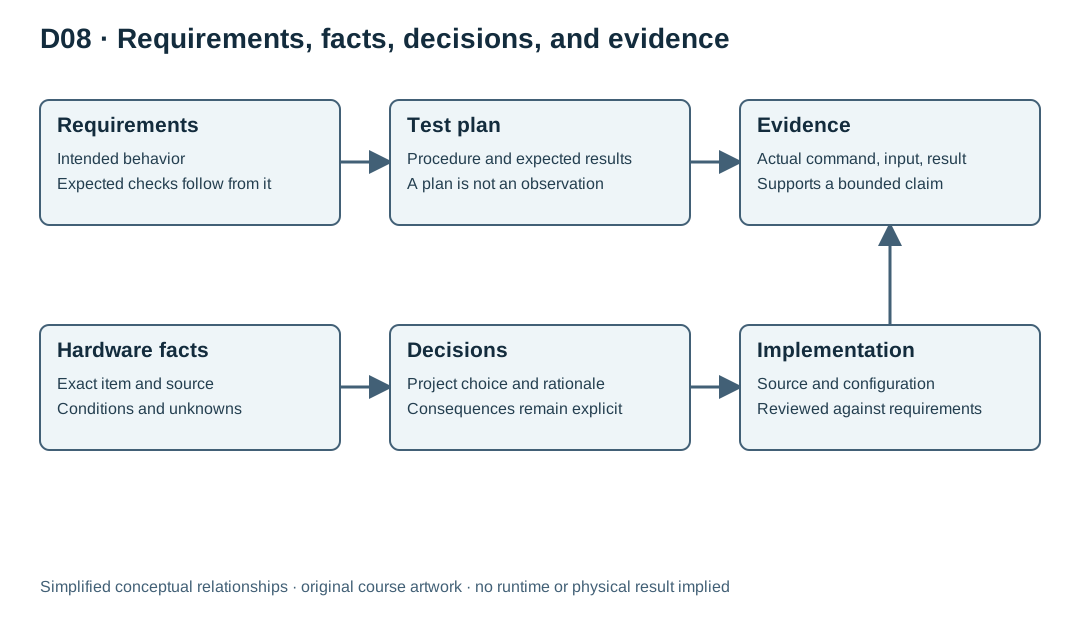
A decision records context, choice, alternatives considered, and consequence. For Sensor Monitor, using host replay as the required core demonstration supports reproducible software learning without physical equipment. Its consequence is that replay cannot establish electrical behavior, sensor accuracy, or MCU timing. This remains true even when every host test passes.
A test plan states a procedure and expected outcomes. Derive the outcomes from requirements before inspecting the implementation. For an inclusive threshold requirement, equality belongs in the planned cases. For startup behavior, read the checkpoint's applicable requirements rather than importing later capstone features into an earlier exercise.
A result records what actually happened: source/checkpoint identity, environment, command, input source, exit result, relevant output, and interpretation. Name a fixture only when the stage actually reads one. The evidence document can link to a saved log rather than reproducing every line. Keep a failed attempt when it explains the defect and recovery. Historical evidence needs clear scope so it cannot be mistaken for the current result.
CP02 prints one fixed synthetic reading and does not yet parse fixtures. Plan a check of that line and its synthetic label. Use the maintained wrapper from the project root:
.\scripts\replay.cmd
Read the output and process result. If the check cannot run, preserve that limitation. “Tests should pass” is a prediction; “tests passed” needs an accessible receipt. A confident agent sentence is not an independent record of execution.
For the worked exercise, classify four statements: the monitor must follow a specified boundary; the selected board has a documented memory variant; the future capstone plans RAM-only configuration; a named fixture produced a particular output during an actual run. The first is a requirement, the second a sourced fact, the third a decision, and the fourth a result whose receipt must be inspectable.
Finish with a handoff naming the current state, reviewed changes, last relevant checks, open questions, and one bounded next action. Do not paste the whole conversation. A new session needs the active evidence and the next uncertainty, not every abandoned idea. Arbitrary Markdown files may need explicit links or a prompt reference before an agent reads them.
Resources and completion
Use the Sensor Monitor CP02 download and its README.md; project paths in this lesson are relative to that root. Read Chapter 9 for the full lab and explanatory review answers. Figure IDs: SS09-03, D08. Primary references: Adafruit product 5477 and GitHub Markdown tables. Complete the exercise, preserve actual evidence, and use the separate instructor answer key for self-check after attempting the task. Narration scripts are production sources; final transcripts must match the actual narrated edit.
Recording transcript
A test plan tells us what we intend to check. A result tells us what happened when we checked it. In this lesson, we will keep those records separate and connect them to a short decision and handoff. Start with checkpoint two and the linked project documents. The goal is an evidence record another person can inspect, even if a particular execution check remains unavailable.
Begin with a decision the project has already made: use synthetic host input for the required core demonstration. Record the context first. The course needs a reproducible software workflow that does not require a physical kit. Then record the choice and its consequence. The current host baseline prints a fixed report; checkpoint five introduces replay of shared policy. Neither establishes electrical behavior, sensor accuracy, USB behavior, or actual microcontroller timing.
That limitation does not make replay useless. It makes its value specific. As the project grows, controlled input will let us reproduce sequences and inspect policy state without depending on room temperature or a connected board. The mistake is not using synthetic input. The mistake is describing its result as a physical observation. Put the limitation beside the decision so a future summary cannot easily lose it.
A useful decision record also names an alternative that mattered. Here the alternative would make physical equipment a prerequisite for the core learning path. We chose a different scope. We do not need a long survey of every possible architecture. Keep the record focused on the choice that explains the current project and the consequence a maintainer needs to remember.
Next, write a plan for one behavior that exists in your checkpoint. Read the applicable requirements before choosing the case. Earlier checkpoints do not contain all the later capstone features or assertion tests. A stage-appropriate plan uses the CP02 fixed synthetic report and checks its documented JSON fields. The source and expectation must match the stage you actually have.
Write the expected outcome before studying the implementation's answer. If a requirement defines an inclusive boundary, equality belongs in the planned cases when that feature is present. Copying a comparison from the implementation into the expected result can make a test repeat the same defect. The requirement is the independent reason for the expectation. The code is what we are trying to evaluate against it.
A plan can be complete before execution. Label it accordingly. It should identify the starting source, input, procedure, and condition that would count as success. A checkbox or a confident sentence does not turn that plan into a result. If the required tool is missing, the right record says which dependency prevents execution. It does not fill the outcome column with a hoped-for pass.
For a current replay check, use the maintained replay command shown in the written lesson and run it from the project root. The Windows wrapper ends in dot cmd. It keeps the environment handling in reviewable project code. Later, when host assertion tests are introduced, their wrapper provides a different check. Record exactly which operation ran rather than calling every successful command a test suite.
Now inspect the actual process result and output. A result record needs the source or checkpoint identity, environment, command, input source, date, exit result, and relevant output. Name a fixture only when that stage actually reads one. It also needs an interpretation. The command may complete successfully while a reader misunderstands what it proves. State that the input is synthetic and name the bounded behavior the observation supports.
You do not need to paste every line into the central evidence page. Keep a concise summary and link to the saved log when the release or exercise has an evidence location. The summary makes the record navigable. The underlying output lets another reviewer inspect it. If a failed attempt explains a defect and correction, preserve it with a clear date and source identity.
Suppose an agent says tests should pass. That is a prediction. Suppose it says tests passed but provides no accessible command result. Ask what ran, against which source, and where the receipt is. If the record cannot be found, mark the claim unestablished and perform the relevant check when possible. Do not manufacture a log to fit the confident summary.
We can practice classification with four statements. The monitor must follow a specified threshold boundary: requirement. The selected board has a documented memory configuration: hardware fact. The future capstone keeps threshold changes in RAM: project decision. A named fixture produced a particular output in a recorded run: result. Notice that the last statement depends on a receipt, while the first three have different sources of authority.
Finish with a handoff. Name the current checkpoint, reviewed changes, last relevant checks with evidence pointers, unresolved questions, and one bounded next action. Avoid copying the whole conversation. The next session needs the active state and the next uncertainty, not every abandoned approach. A sentence such as continue improving everything leaves the next worker to reconstruct the task from scratch.
Your exercise is to write the synthetic-core decision, a stage-appropriate check plan, and a result from a real available run. If no run is available, mark it unperformed and state what is missing. Add the short handoff. Keep source-code changes out of this documentation exercise unless the task explicitly requires them, and preserve the starting copy for recovery.
Review the records by asking whether a stranger could confuse a proposal with an observation. If the answer is yes, improve the labels and evidence pointers. A truthful open check is more useful than a decorative pass. You now have the basis for a project history that can support engineering decisions without asking the next person to trust your memory or an agent's tone.
Keep historical records scoped to their source version. An old failure can remain accurate history after a fix. Marking its status and linking the newer result is clearer than silently rewriting it into a success.
Download transcript