M02-L05 — Challenge: save only what belongs
Outcome: Exclude harmless generated output while preserving and committing the intended change.
Start: M02-L01–04; disposable CP01 practice repository with an existing baseline.
This challenge checks whether you can use repository state to choose a precise recovery. The starting repository already has a baseline commit. It contains a useful README edit and a harmless generated teaching file named build-note.tmp. Both have been staged deliberately. The task is to keep the useful edit and exclude the temporary file without deleting useful work.
Inspect git status, git diff, and git diff --cached before changing state. Read the content of the teaching temporary file so you know what it is. This exercise never uses credentials or private data. The unwanted path is newly staged after an existing commit, which makes the recovery context explicit.
Use git restore --staged -- build-note.tmp to remove that path from the next commit while keeping the working file. Add the exact ignore entry for this teaching artifact, inspect .gitignore, and stage only the intended README and ignore change. Ignore patterns affect matching untracked paths; they do not erase previously committed history. git restore, gitignore
Review the final cached diff before committing. The temporary file must be absent, the useful README edit must remain, and the ignore rule must be suitably narrow. An empty diff achieved by discarding everything would fail the task because it loses the intended improvement.
Finish with a review note explaining the starting state, what you preserved, what changed in staging, and what entered history. Complete Q02. Your observable evidence is the actual selected snapshot and final file state, not merely a checked progress box.
Practice and completion
Complete the exercise, then compare your artifact with the separately distributed instructor answer. A lesson acknowledgment records your own progress; it does not certify that a physical test occurred.
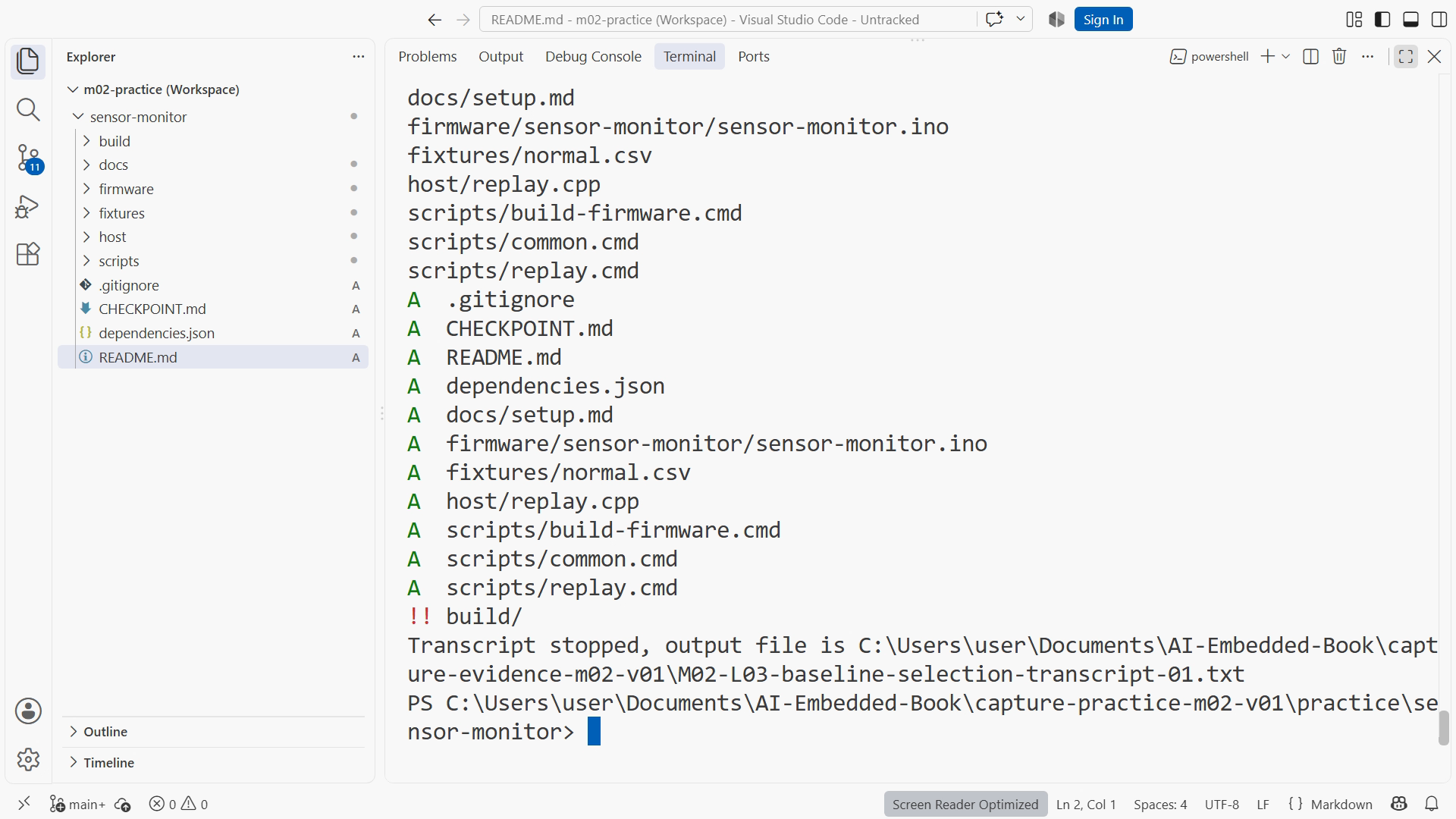
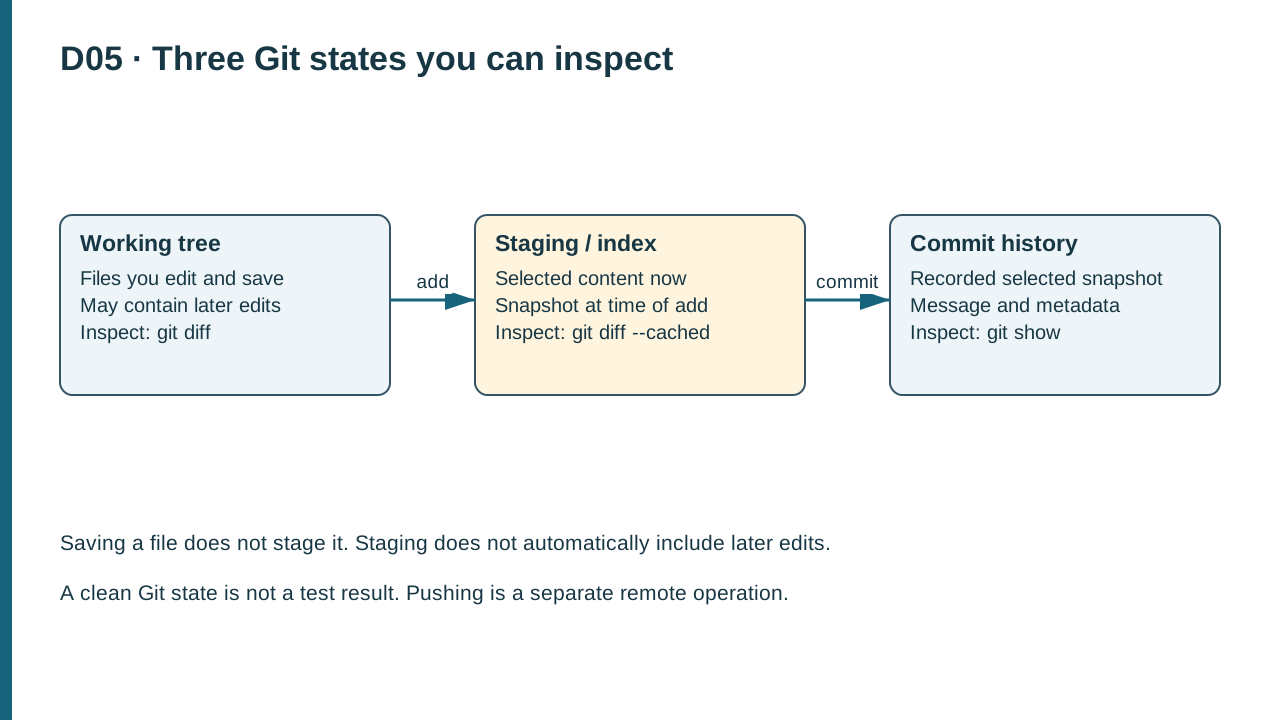
Chapter 4, Chapter 5. Resources: Project checkpoint guide and toolchain setup. Figure references: SS05-02 and D05. SS05-02 shows the earlier baseline selection, with source files staged and generated build/ output ignored. It illustrates the distinction between source and generated output. It does not show this challenge’s temporary-file recovery; the lesson recording shows the actual build-note.tmp creation, unstage, ignore-rule edit, final commit and saved review note.
Recording transcript
This module challenge is about choosing what belongs in a commit and recovering from a harmless selection mistake. We will keep a useful README change while excluding generated teaching output. The task is small, but the habit matters whenever an agent or a build creates files that you did not intend to preserve in history.
Use the disposable CP01 practice repository with an existing baseline commit. That starting condition matters. We will deliberately stage a new temporary file after history already exists. Do not perform this exercise in your home directory or an unrelated work repository, and do not use a real credential as the example of something that should not be committed.
Create a file named build-note dot tmp containing the harmless teaching sentence supplied in the exercise. It represents generated output. Also make a useful README clarification that you want to keep. Stage both files deliberately. The mistake is now concrete and recoverable: one selected path belongs in the commit, while the other does not.
Before changing anything, inspect state. Run Git status, the ordinary diff, and the cached diff. Identify the useful README content and the temporary file's contents. A final summary saying two files changed is less useful than seeing exactly what those files contain. Your recovery should follow from that evidence rather than a memorized command chosen from a search result.
State the goal in plain language. Preserve the README improvement. Remove the temporary file from the next commit. Keep the working file available so we can demonstrate that unstaging is not deletion. Add a narrow ignore rule appropriate to this teaching artifact. These outcomes let us judge the recovery independently of whether the terminal ends with a reassuring message.
Run the restore command with the staged option and the exact temporary path. The staged option changes the index. It does not discard the working file. Inspect status again and open the temporary file in the editor. It should still exist with the same harmless content, while it is no longer selected for the next commit.
This differs from restoring an uncommitted working edit. A working-tree restore can discard selected local content by replacing it from another state. That is useful when you explicitly want to throw away an edit, but it is not what this challenge asks. Always name whether you are changing working content, staging selection, or recorded history before choosing a recovery command.
Now edit dot gitignore. Add an exact entry for build-note dot tmp. In actual project work, generated output should normally go in the documented build directory and use the project's existing exclusions. Our exact teaching entry keeps the example easy to inspect. Avoid a broad pattern that might hide real source files or fixtures just because their names happen to match.
Ignore rules apply to matching untracked files. They do not remove a file that was already tracked in a commit, and they do not erase sensitive content from history. That is why we specified the starting state and chose harmless output. A previously committed artifact requires a different cleanup decision. Do not assume that adding an ignore rule can repair every version-control mistake.
Stage the intended README and ignore changes, then inspect the cached diff. The useful clarification should be present. The ignore rule should be narrow and understandable. The temporary file should be absent from the selected snapshot. If you simply discarded all changes, the unwanted file might disappear from the diff, but you would also lose the improvement and fail the task.
Commit the reviewed selection with a message explaining the actual result. Inspect the history and current commit summary. The message should fit the content: a report clarification and its relevant generated-output exclusion. If the two ideas are unrelated in your own project, separate commits may be clearer. In this challenge, explain the boundary you chose rather than relying on a generic update message.
Now check the working state again. The harmless temporary file can remain on disk while being ignored. That is normal. A clean ordinary status does not mean the folder contains only committed files. It means the comparison and untracked listing follow Git's tracking and ignore rules. Understanding that distinction prevents confusion when generated artifacts still appear in the file explorer.
Write your review note using four fields. Describe the starting state, the useful content to preserve, the targeted operation, and the observed result. Include the actual command and path. This short record is more useful than a statement that Git was fixed, because it explains which data changed and which data remained available.
Consider how the same pattern applies to agent work. An assistant might create a draft note, build output, or a source edit during a task. You do not need to commit everything it produced. Inspect each artifact against the purpose of the change. Preserve useful work, exclude generated material appropriately, and make the final selected snapshot easy for another person to review.
Try predicting the file explorer and status display before each step. After unstaging, the temporary file remains visible on disk and may appear as untracked. After adding the exact ignore rule, it remains on disk but ordinarily stops appearing as an untracked candidate. Those predictions help you understand the mechanism instead of memorizing a successful command sequence. If the result differs, inspect whether the file was already tracked, whether the pattern matches, and whether you are in the intended repository.
Complete the exercise by submitting before-and-after state, the final commit summary, and your explanation of unstage, discard, and ignore. Then take the module quiz. If you confuse two operations, repeat the disposable example slowly and predict the affected state before running the command. You are ready for GitHub when you can preserve a meaningful local history and explain exactly what will be synchronized.
Download transcript