M03-L04 — Resolve a conflict and undo a fault
Outcome: Resolve intended text and distinguish restoring a working edit from reverting a committed fault.
Start: M03-L03; separate clones of the supplied generic history bundle.
Use three disposable exercise folders for conflict, restore, and revert. The prepared bundle contains generic teaching history. It is separate from your useful project and contains stable content tags and two conflict branches. Begin each operation by inspecting location, status, and history.
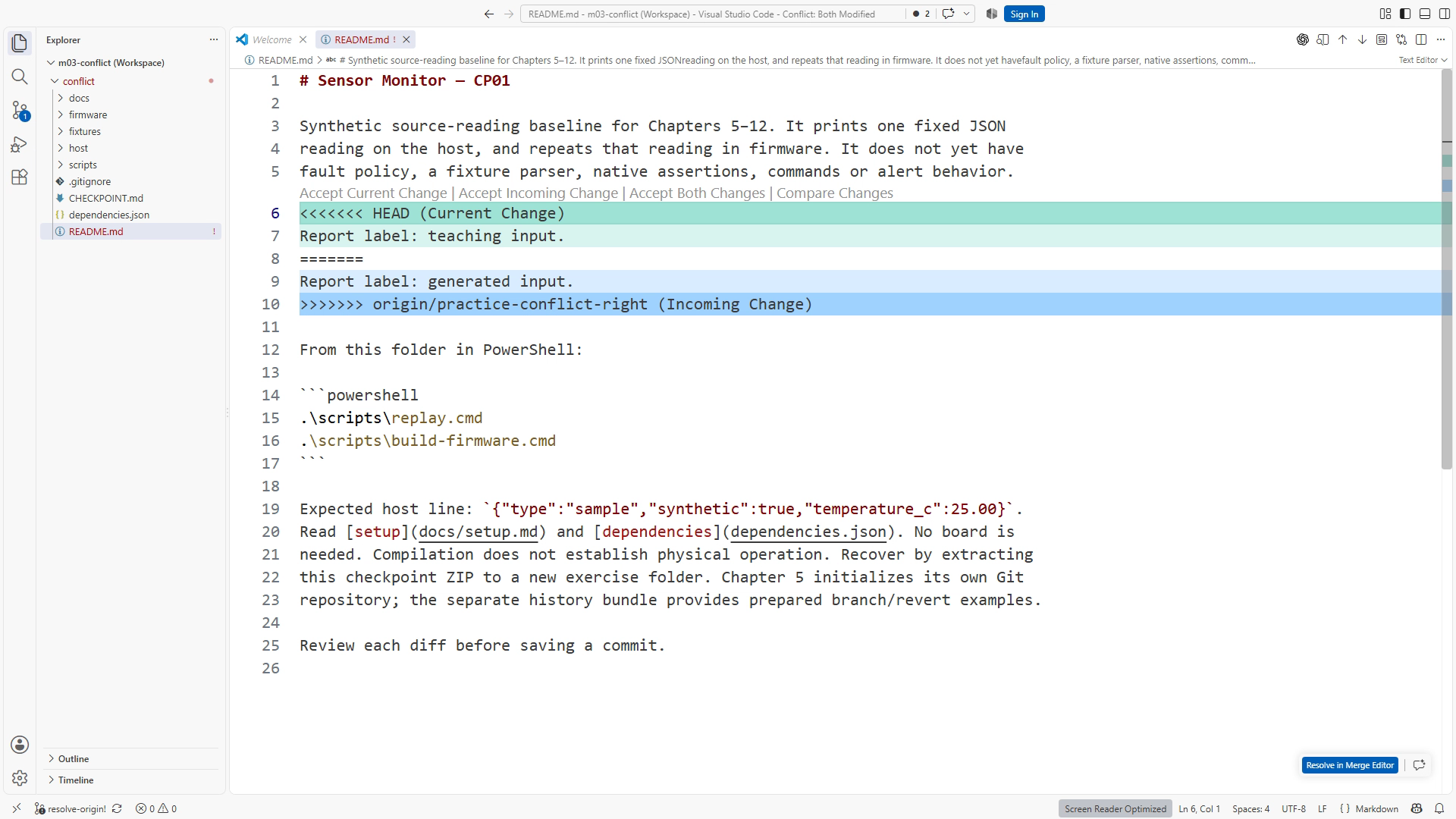
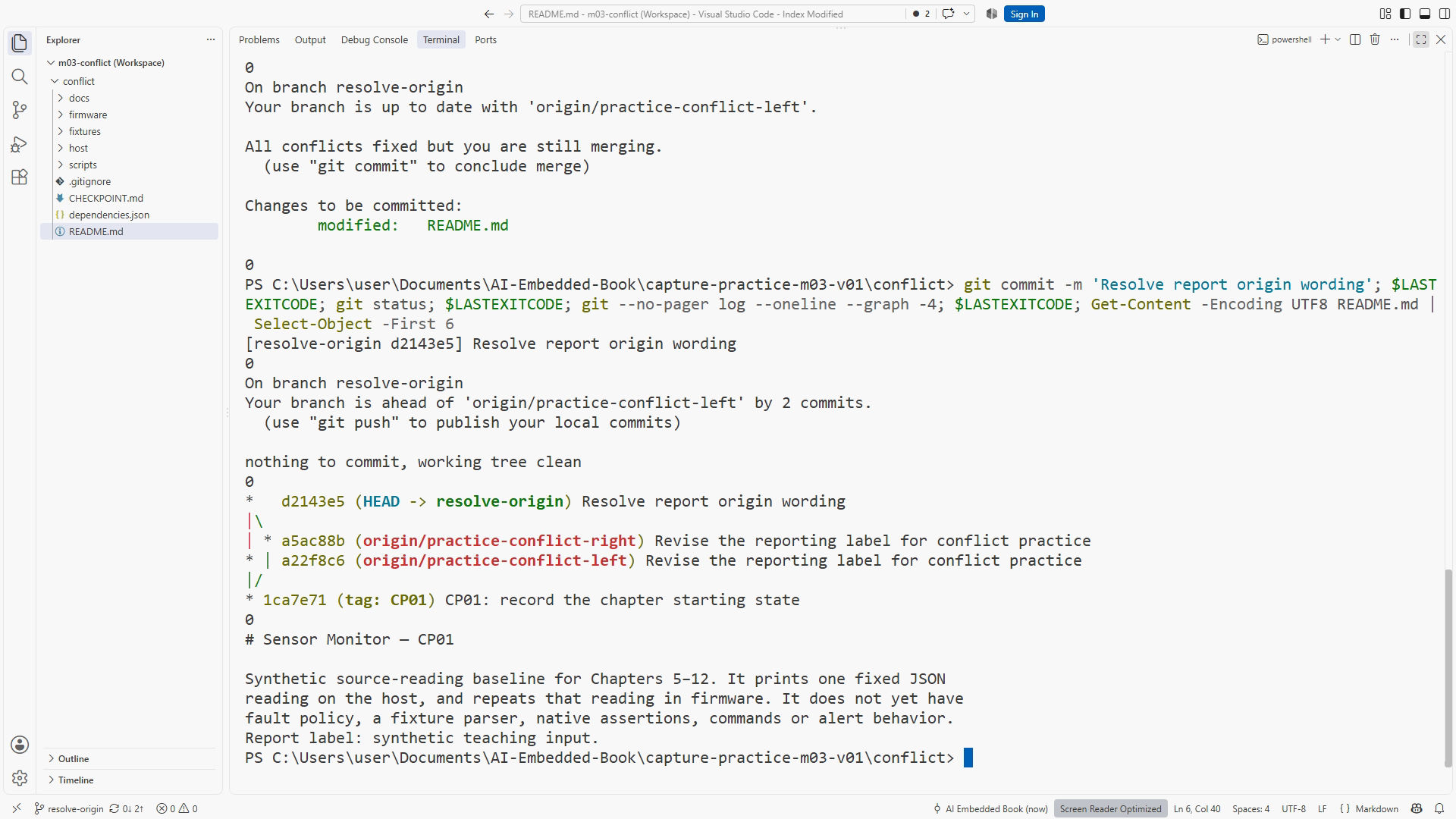
For the conflict clone, create your branch from origin/practice-conflict-left and merge origin/practice-conflict-right. The two branches change the same README report-label line. Read both meanings and resolve to Report label: synthetic teaching input. Remove all markers, stage README, inspect the cached diff, and commit. Accepting both sides automatically can leave duplicated or contradictory text. git merge
For restore, start a separate clean CP01 branch, make one unwanted unstaged README edit, inspect it, then use git restore -- README.md only after deciding to discard that edit. The default source is the index, which matches the baseline in this prepared clean-start example. --staged would instead alter staging selection. git restore
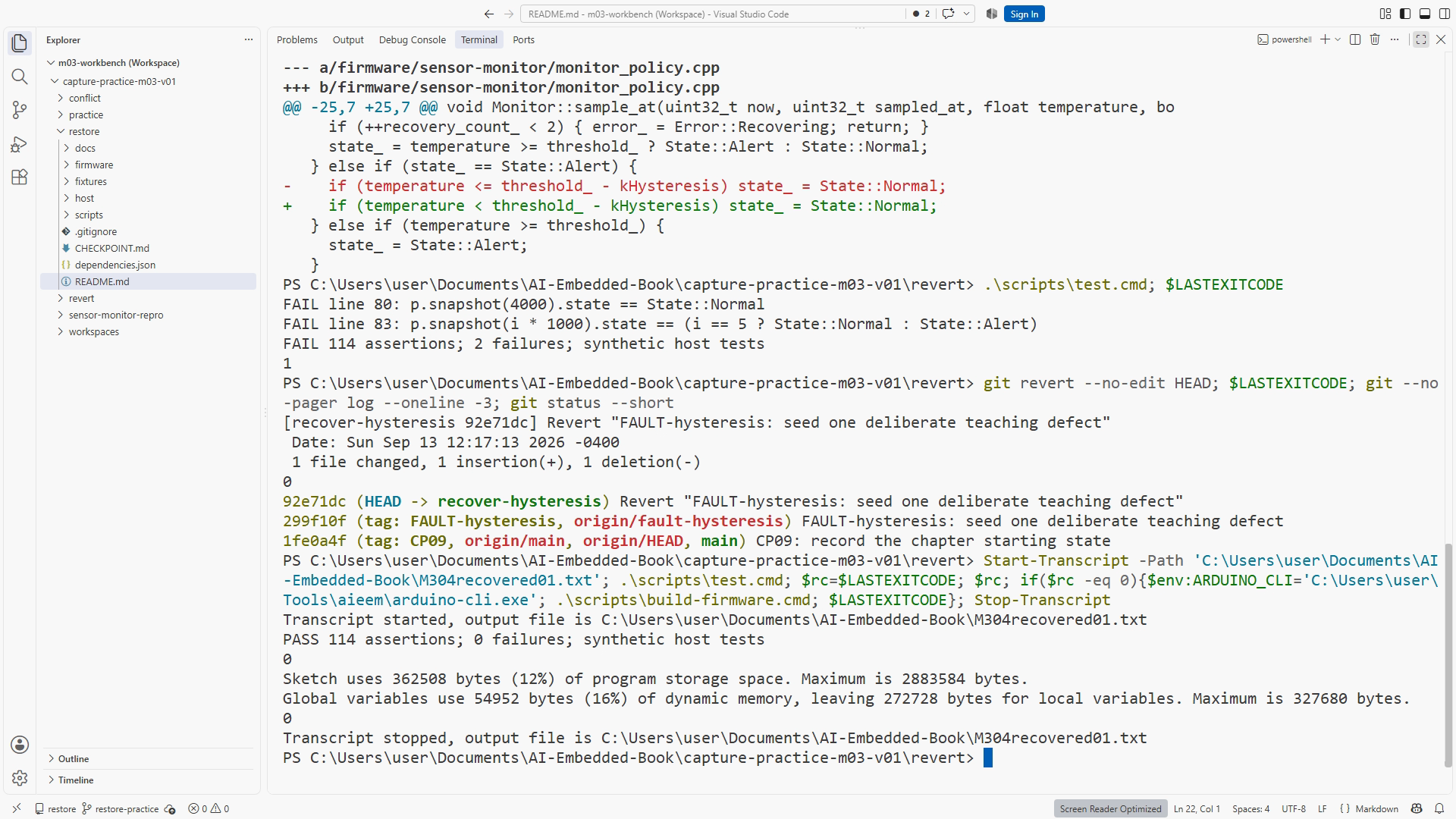
For revert, create a branch from FAULT-hysteresis in another clone. This prepared later-project fault uses a strict comparison that misses the clear boundary at 27.0 °C. You need not implement the later policy now; use its supplied expected case to practice historical recovery. Inspect HEAD, reproduce the failing native test, run git revert --no-edit HEAD, and rerun scripts/test.cmd plus the firmware build. git revert
A revert records a new corrective commit and preserves earlier history. Record actual before/after output and keep it labeled software evidence. The use of a later prepared fault is a Git exercise, not a claim that you have completed the capstone.
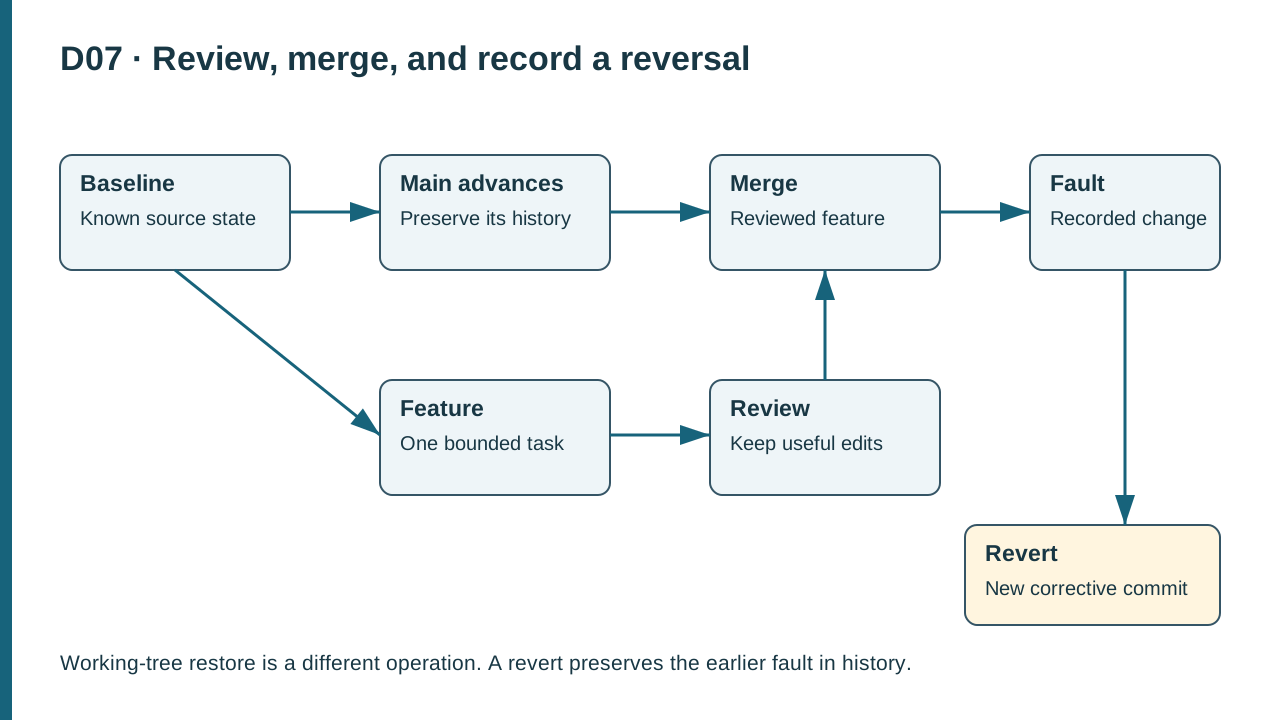
D07. A feature develops from a baseline, is reviewed and merged, and a later fault can be reversed by a new commit while the faulty commit remains in history.
Practice and completion
Complete the exercise, then compare your artifact with the separately distributed instructor answer. A lesson acknowledgment records your own progress; it does not certify that a physical test occurred.
Chapter 7. Resources: Exact recovery sequence. Figure references: SS07-04–06; D07.
Recording transcript
Recovery becomes manageable when you name the state and the content you want to preserve. This lesson uses three separate disposable folders. In one, we resolve a text conflict. In another, we discard one unwanted uncommitted edit. In the third, we reverse a committed fault while retaining history. Keeping these exercises separate prevents one recovery operation from destroying another exercise's useful work.
The supplied history bundle contains generic manufactured teaching commits and stable checkpoint tags. Clone it into a new conflict folder and inspect the available branches. Create your working branch from the prepared left conflict branch. Then merge the prepared right conflict branch using the command sequence in the written resources. Begin clean so that the example's recovery path is understandable.
Both branches changed the same README report-label line. One describes teaching input and the other generated input. Git cannot decide which wording you intend, so the merge reports a conflict. That is a request for a content decision, not proof that the repository is broken. Open the file and read the marked sections with their labels.
In this ordinary merge, the upper contribution belongs to the current side and the lower contribution to the branch being merged. Current does not mean correct. Read the surrounding document and the requirement that all demonstration input remain explicitly synthetic. The best resolution may be a new sentence that captures the useful intent of both sides.
Use the agreed sentence from the lesson: Report label: synthetic teaching input. Remove the marker lines and rejected duplicates. Preview the README and read the whole paragraph. A control labeled accept both can be convenient, but it cannot judge whether the result is coherent or whether it loses the crucial origin label.
Stage README to mark the path resolved, then inspect the cached diff and status. Staging says the file is ready to complete the merge; it does not certify its meaning. Commit the resolution with a descriptive message and inspect the final state. Save the competing text and resulting sentence in your exercise record.
If you are not ready to resolve, abort the merge using the documented command and inspect status. The clean starting state matters. An abort operation should not be treated as a promise to reconstruct arbitrary unrelated edits that existed before the merge. Preserve useful work before entering a complex operation rather than expecting recovery to guess your intentions.
Now move to the separate restore folder. Start a clean branch from CP01 and make one harmless README edit that you explicitly do not want to keep. Do not stage it. Inspect the path-specific diff. Before running restore, explain which content will be lost and confirm that nothing useful is mixed into that file edit.
Working-tree restore replaces the selected file from the index by default. In this prepared example, the index matches the baseline commit because we began clean and did not stage anything. The command discards the unwanted working edit. Inspect the file and diff afterward to confirm the actual result.
This differs from restore with the staged option. The staged option changes the selected snapshot while preserving working content, as we practiced in the previous module. The same command family can affect different places depending on its options. Name the target state before you act: working tree, staging area, or history.
For the third exercise, use another clone and create a branch from the supplied FAULT-hysteresis tag. This is a prepared later-project example used only to practice Git recovery. It contains the full tests needed to show an isolated bad comparison. You are not being asked to implement the capstone now or understand every later policy feature before continuing.
Inspect the current commit and verify that HEAD is the isolated seeded fault. The defect uses a strict comparison that misses clearing at exactly twenty-seven degrees Celsius. That is different from the introductory warning-entry boundary at twenty-eight. Read the supplied expected case and run the native tests to observe the specific failure before attempting recovery.
Run revert with no-edit on that verified HEAD commit. Revert creates a new commit that reverses the selected change. The original fault remains visible in history, followed by a corrective event. This is useful for shared work because earlier references are preserved rather than silently rewritten. In more complex history, a revert can conflict; our isolated exercise keeps the basic operation clear.
Rerun the same native test command and the documented firmware build. Save the actual results. The expected recovery is a failing boundary check before the revert and passing checks afterward, with a new revert commit in the log. These are software observations. They do not show a physical sensor or alarm operating on a board.
Write one short record for each folder: starting state, useful data to preserve, chosen operation, and observed result. For the conflict, preserve both useful meanings. For restore, discard only the unwanted uncommitted edit. For revert, preserve history while reversing the isolated fault. If your record cannot explain that distinction, repeat the relevant disposable example before proceeding.
The three folders also help you compare evidence afterward. In the restore example, no new corrective commit is expected because you discarded an uncommitted edit. In the revert example, a new commit is the expected evidence of historical reversal. In the conflict example, the merged content and completed merge record both matter. If all three notebooks simply say clean, they omit the distinctions this lesson is designed to teach. Record the operation's actual effect, not just its final quiet state.
You are ready for the final module challenge when each recovery has a concrete purpose and verified outcome. A quiet status display is not enough if the requested improvement disappeared with the mistake. Compare the final content and behavior with the original requirement, and keep the evidence that lets another person follow your decision.
Download transcript